Referee competence and publishing referees
How referee competence levels are named per season, the league settings that use them (top level league, coach and referee minimum competence), the warning PL shows when a referee's competence is too low, the two publish settings that decide what happens to assigned referees when a changed match is published again, and referees duplicated in FX.
For other roles
Every referee in Profixio League (PL) must have a competence assigned. Competences are most often used as a filter when selecting referees for matches.
The competence of a referee comes from official data in FX. For example, the Swedish Basketball Federation has a model which connects competence to a licence.
Open the "Settings" menu, choose "Organisation setup" and go to the "Referee setup" tab. The grid "Set referee type name:" lists the competence levels of the organisation.
- "Level" is a number which makes it possible for the system to know who can referee certain leagues. A referee can referee all levels with equal or lower competence.
- "Name" is the name of the competence. It can be changed to whatever name you like, and this name is shown everywhere in PL.
- Each season can have its own competence system. As default, a season's competences are copied from the last year's competences.
- Remember to save changes with "Save changes".
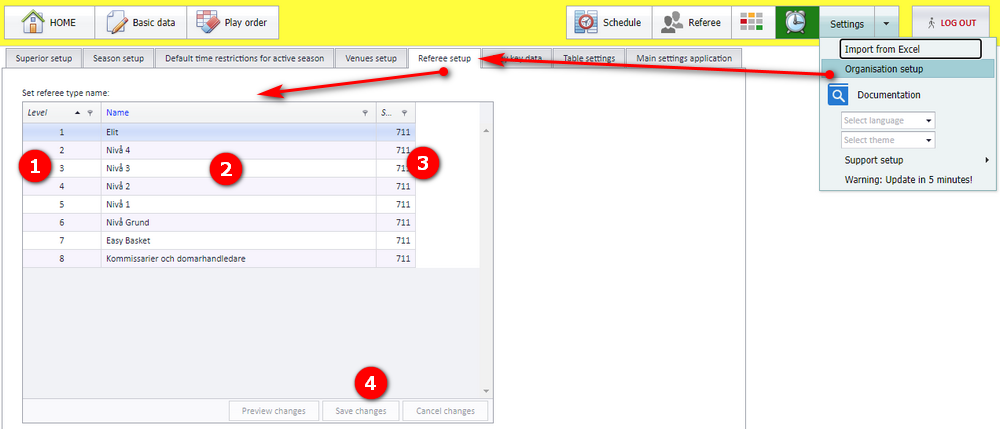
The example in the screenshot uses eight levels: 1 Elit, 2 Nivå 4, 3 Nivå 3, 4 Nivå 2, 5 Nivå 1, 6 Nivå Grund, 7 Easy Basket, 8 Kommissarier och domarhandledare.
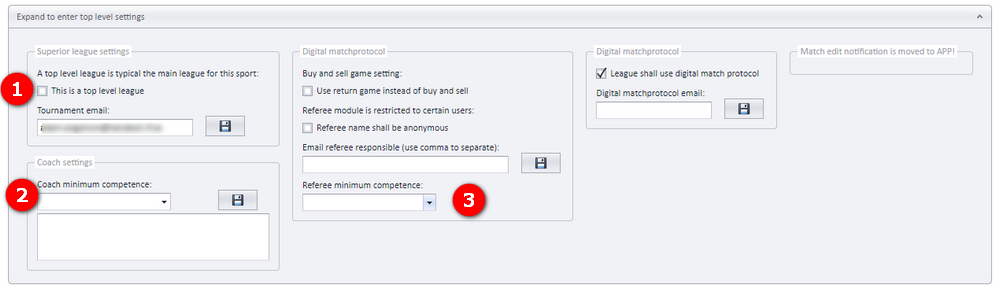
Three settings on a league involve referee competence. They are found in the panel "Expand to enter top level settings".
| Setting | What it does | Where |
|---|---|---|
| "This is a top level league" | A match in a top level league can get a referee who is already taken by a match in a lower level league; check for double bookings in lower level leagues before you nominate. If a referee is nominated to a top level match, it is the referee's responsibility to remove himself from matches in lower leagues which duplicate. | Group "Superior league settings" (marker 1) |
| "Coach minimum competence:" | Minimum competence for coaches. The description comes from FX. | Group "Coach settings" (marker 2) |
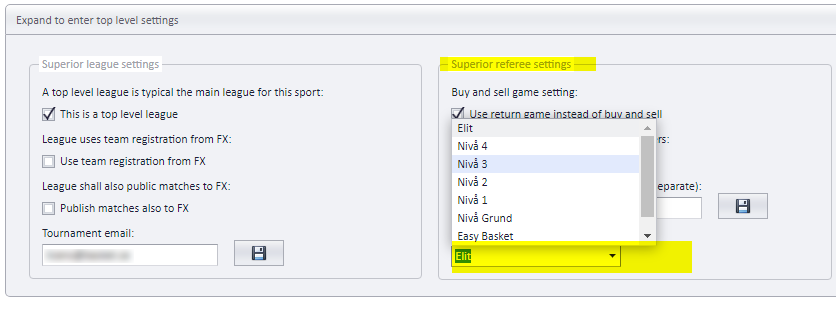
| "Referee minimum competence:" | It is not required to set a minimum level of referee competence on a league. But it can be done, and then PL checks if matches have a referee with the correct level of competence. Choose the lowest accepted competence from the list. | Group with the referee settings (marker 3) |
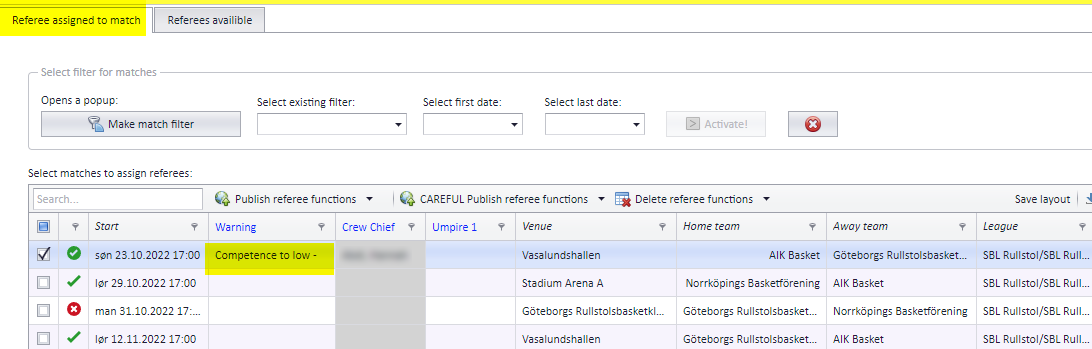
When a league has a referee minimum competence and a match has a referee below it, the "Referee" menu shows the text "Competence to low" in the "Warning" column of the match grid on the "Referee assigned to match" tab.
A match which has been published, then changed in time or venue, and then published again, affects the referee(s) assigned to that match. A match where time and venue are not changed does not affect its referees.
Two checkboxes in the "Publish actions" box decide what happens to the referees on changed matches:
- "Keep referees unchanged" If checked, referees are not changed when publishing, no matter whether matches have changed time, venue or anything else. Checkbox 2 then has no consequences. If unchecked, the setting in checkbox 2 decides the action.
- "Remove assigned referees if accepted or nominated" If checked, referees on changed matches, both accepted and nominated, are removed from the match. If unchecked, referees which are accepted on changed matches are set to nominated.
In both cases a notification is sent, unless notifications are turned off ("Turn OFF all notifications!").
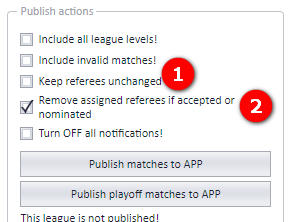
The same box also holds "Include all league levels!", "Include invalid matches!" and the buttons "Publish matches to APP" and "Publish playoff matches to APP"; those are described under "Publishing the schedule".
A referee must exist only once in FX. A referee can, by mistake from a user, be registered twice in FX; PL then shows that referee twice in the referee calendar and in the matches in the app. Check FX for a duplicate when the same referee appears more than once.
- Who can open the Referee menu and how the referee grids work: see "Referee appointment overview and access".
- Putting referees on matches and taking them off, including the "Publish referee functions" buttons: see "Assigning and removing referees on matches".
- Nominated versus accepted referees, and the buy-and-sell setting: see "Nominating, accepting and buy and sell".
- How referees registered in FX reach PL: see "Keeping PL and the web referee module in sync".
- The other checkboxes and buttons in "Publish actions": see "Publishing the schedule".
- The other tabs of "Organisation setup" and the season settings: see "Organisation and season setup".
- What a notification contains and who receives it: see "Notifications when a match changes".
Was this page helpful?