The player squad on a match
Seeing and maintaining the squad registered for a single series match: who can see the players, how to hide them from the public, and how a club's registration officer and team leaders add players for a club and for a match.
Unless you have chosen to hide players in matches, the players on a match are visible to everyone.
A player squad can either be fetched from the federation, or players can be typed in as free text. Free-text players are common in ordinary cups. In series play organised by a federation, it is most common that players must be licensed, and they are therefore fetched from the federation's register.
The players on a match are shown by opening the team. A good place to start is to search for the team via the "Lag" (teams) menu.
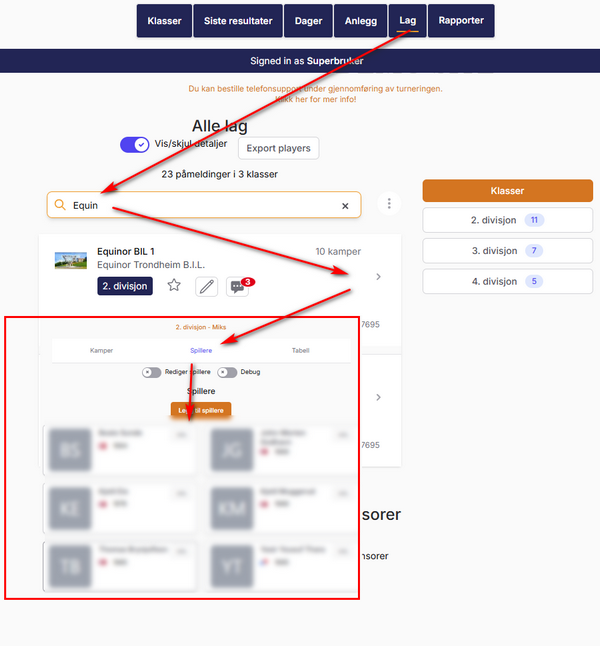
For other roles
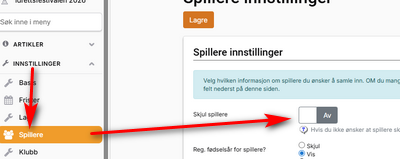
If you do not want the players to be visible to the public, you can hide them as shown here.
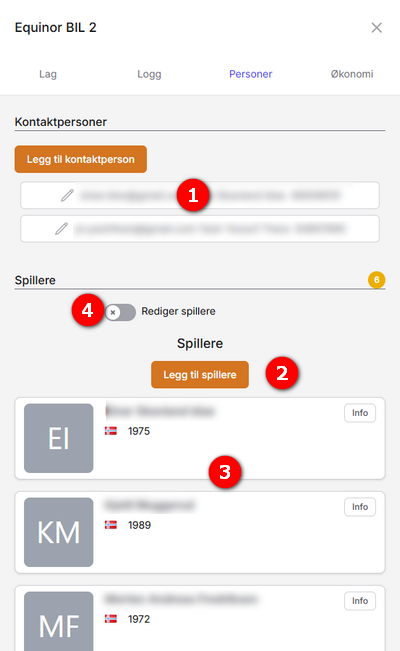
Players can only be added by the person who is the registration officer ("påmeldingsansvarlig") for the club with NIF (the Norwegian Olympic and Paralympic Committee and Confederation of Sports). Once players have been added for a club, those players are available in other series as well, without the person registering the team needing to be the club's registration officer with NIF.
- Here the team's "owners" are listed, i.e. the contact persons who can administer the team.
- Click "Legg til spiller" (add player) to download players from NIF's player register.
- All players are now shown in a list.
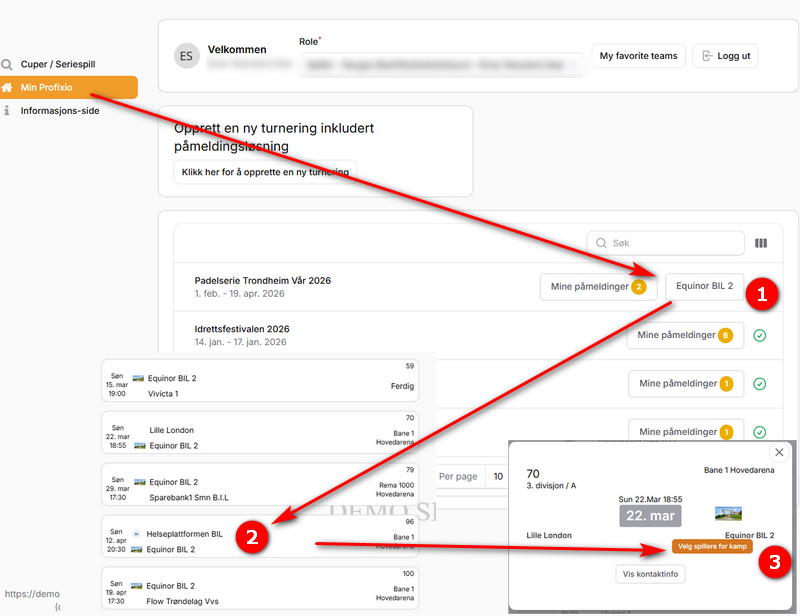
When a team leader is signed in, all their access is shown via "Min Profixio" (My Profixio).
These rules apply for when players can be added to a match:
- Players can be added to a match only in competitions where players are fetched from the federation (licensed players only).
- Tournament: the team leader can add players until 5 minutes before the match starts.
- Series: the team leader can add players until 60 minutes before the match starts.
- The match date must be within 15 days from now.
- Open the relevant series / club.
- Find the match and click it.
- Select the players who will play this match.
- How players are registered for a team in the first place (licensing, the club's player register) is described in the help pages for players, not here.
- The team list in Profixio League and the functions on it: see Teams in a league.
- Publishing the schedule so that matches become visible to clubs and the public: see Publishing the schedule.
- What clubs and team leaders can do with match times in the app: see Letting clubs set times in the app.
Was this page helpful?