Referee groups, pairs and calendars
Building a shortlist of referees as a personal referee group, pairing two referees so they are assigned together, and reading a referee's busy or restricted calendar when you appoint referees in Profixio League.
For other roles
A referee group is a shortlist of referees you build yourself. It can contain whatever combination of referees you like, and you then use the group as a filter so that only those referees are offered when you assign referees to matches.
Groups can be added and deleted, and a group's name can be changed. The referees in a group are otherwise fixed once it is saved: you can add more referees to an existing group at any time, but to take a referee out of a group you delete the group and make a new one with the right referees.
A group is personal. Only the person who made a group can see it.
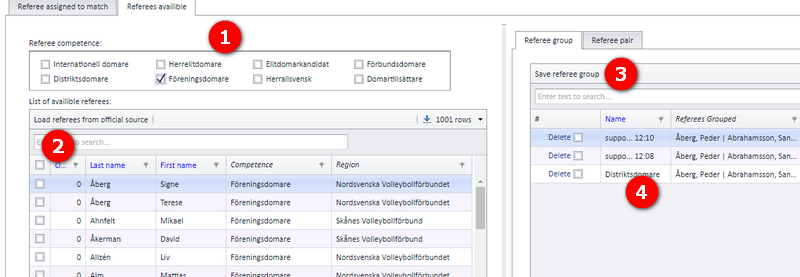
Open the "Referee" menu ("Domare" in the Swedish interface). First select the referees that shall be in the group.
- Use the list box for a fast selection of referees.
- Add referees by ticking the checkbox in front of each referee.
- Save the group.
- Change the name of the group if you want.
Tip: the columns to the right of point 4 show the date each group was made and the user who made it, so you can see and select groups by date and by user.
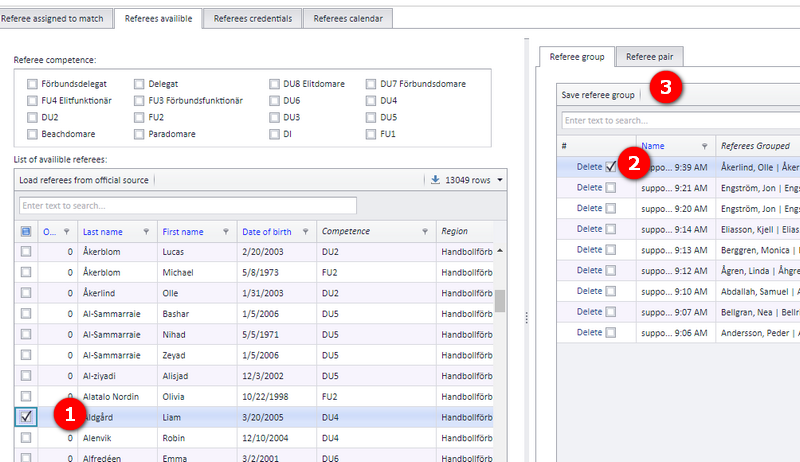
- Select one or several referees in the list.
- Select one or several groups you want to add the selected referee(s) to.
- Click "Save referee group".
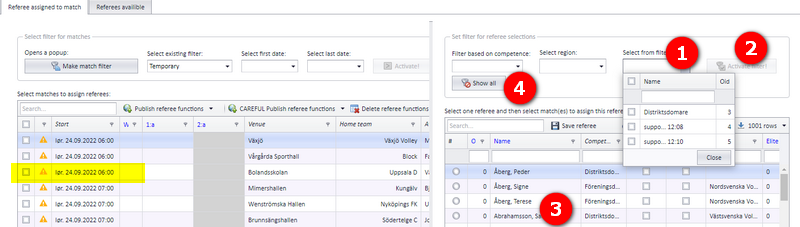
A referee group is used from the tab "Referee assigned to match" ("Tillsätta domare på match" in the Swedish interface).
- Select one or several groups.
- Activate the filter.
- You can now select among the referees in the group when you assign referees to matches.
- Clear the filter with the button "Visa allt" (show all).
Two referees can be put together as a referee pair and assigned to matches together. A referee can be included in several referee pairs.
A referee pair cannot be edited after it is saved. A referee pair can be deleted even if it is used on matches; the referees stay on the matches they were assigned to, deleting the pair does not remove them from their assignments.
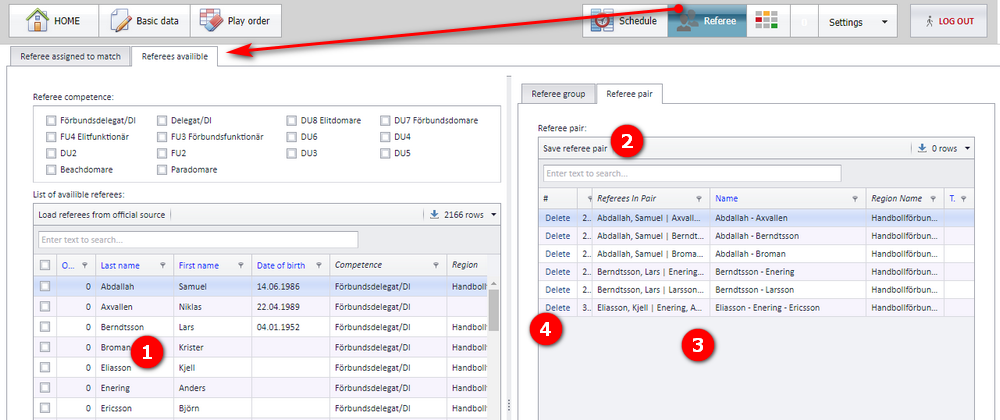
Open the "Referee" menu and then "Referees available" ("Domare" and "Tillgängliga domare" in the Swedish interface).
- Select two referees from the list...
- ...and click "Save referee pair" ("Spara domarpar").
- The pair is shown in the list of pairs.
- Click "Delete" ("Radera") to delete a pair.
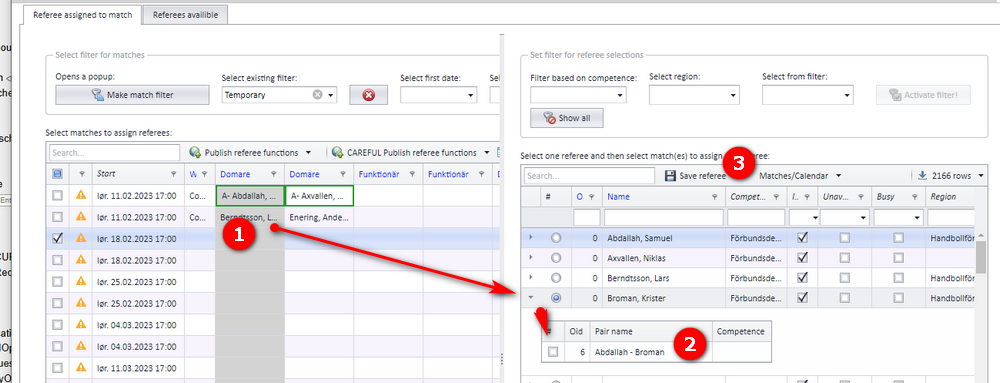
The first referee in the pair is assigned to the first referee column you selected, and the second referee in the pair to the next column.
If the match already has referees in those columns, they are replaced by the referees in the pair. A notification is sent to the referees who had accepted the match or were set as nominated on it.
- Select one or several matches and select one of the referee columns.
- Click the expanding arrow and tick the referee pair you want to use.
- Save the pair to the match.
Two calendars can be shown for a referee: one showing the matches the referee is assigned to, and one showing the referee's restricted periods (called availability, "tillgänglighet", in the Swedish interface). The restricted periods are the ones the referees set themselves in the web referee module (FX).
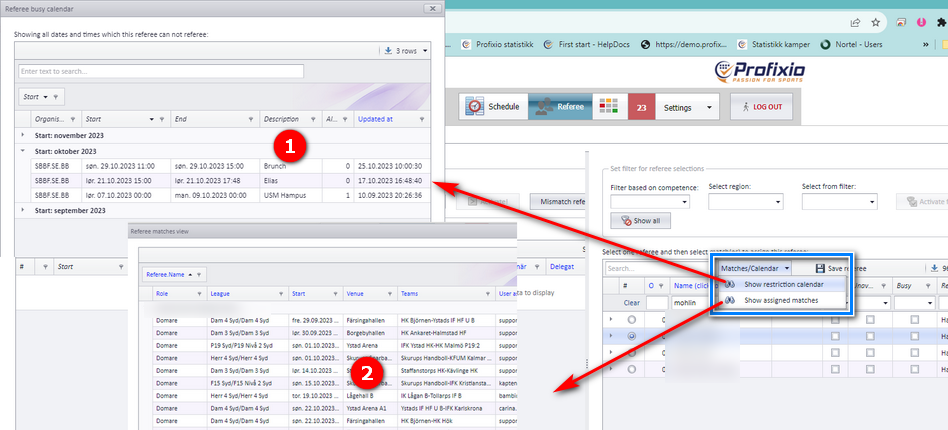
When a referee has accepted a match, that match shows up in the referee's list of matches and makes the referee busy at that time. Only accepted matches count: a referee who is only added in PL, or nominated, is not shown as busy.
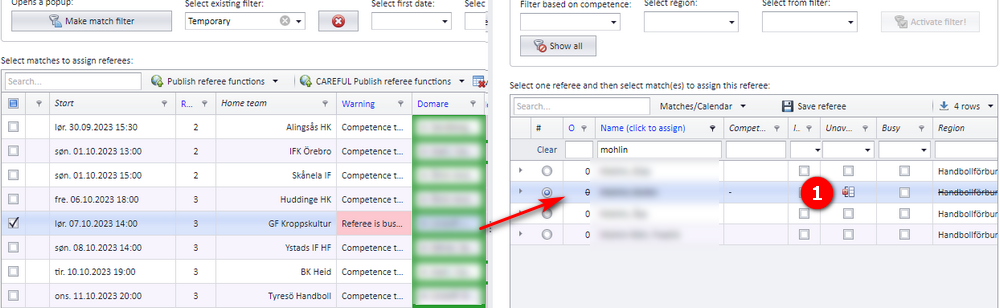
When you assign a referee to a match, every referee who is busy or restricted at the time the match is played has a strike-through on their name. A busy referee can still be assigned: you overrule the strike-through.
This page is about the tools that narrow down which referees you pick from. Who may open the referee tabs in PL and how the appointment screens are laid out is on "Referee appointment overview and access". Putting single referees on matches and taking them off again is on "Assigning and removing referees on matches". What happens after a referee is nominated, how referees accept, and buy-and-sell between referees is on "Nominating, accepting and buy-and-sell". Referee competence and publishing referees is on "Referee competence and publishing referees". How PL and the web referee module (FX), where referees set their restricted periods, stay in step is on "Keeping PL and the web referee module in sync".
Was this page helpful?