Referee appointment: overview and who may appoint
How the referee module in Profixio League is organised, how referees are loaded into PL, the basics of putting a referee on a match, giving a person a referee assigner credential and what that person can do, and the referee responsible on a league.
For other roles
Profixio League (PL) has a "Referee" menu where the federation or district appoints referees to the matches of its leagues. The "Referee" menu has three tabs:
- "Referee assigned to match" – the match list where referees are assigned to a role on a match.
- "Referees availible" – the list of referees loaded into PL, with their competence, and the "Referee group" and "Referee pair" tabs.
- "Referees credentials" – where a person is given the right to assign referees in selected leagues.
Referees can be assigned to group play matches only if the matches are published. Referees do not show up anywhere other than in PL while the matches are not published.
When a match is moved, the referees on it are either set to be nominated again or removed from the match; which of the two happens is decided per federation (see "Differences per federation" on this page).
Group play matches that are set to have club match edit on a date ahead do not show up in the list of matches. Playoff matches always show, regardless of the club match edit date.
Referees must be loaded into PL at least once for each season and each organisation. The load is done on the "Referees availible" tab with the button "Load referees from official source" (1). After one load is done, newly added or changed referees are checked every time a season is checked, that is when PL is started.
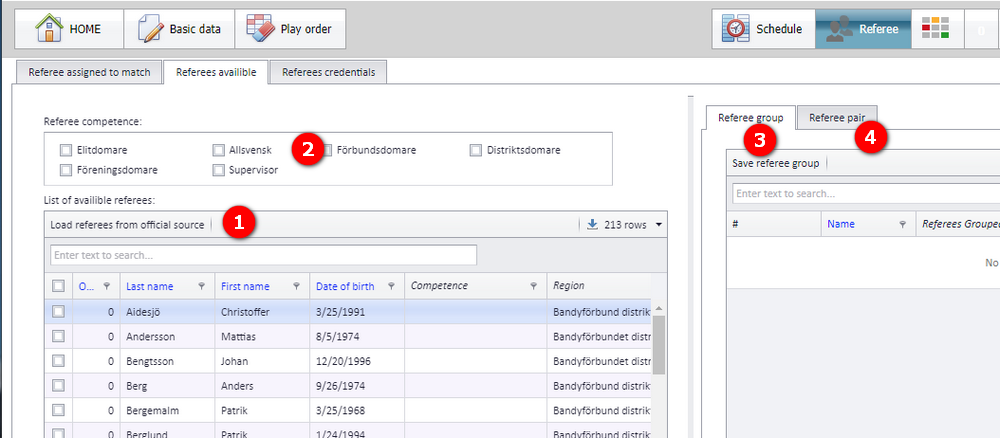
On the "Referees availible" tab: (1) "Load referees from official source" above the "List of availible referees"; (2) the "Referee competence" filter; (3) the "Referee group" tab; (4) the "Referee pair" tab. The referee list shows last name, first name, date of birth, competence and region.
The official source is the referees found in the web referee register.
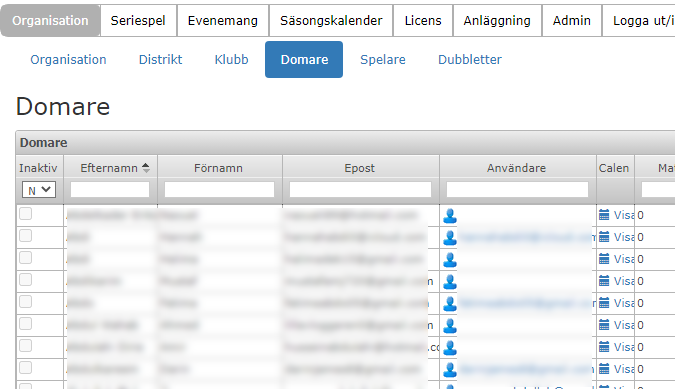
A referee type is the role (not the competence) a referee has during the match. The number of referee types comes from the organisation data of the federation.
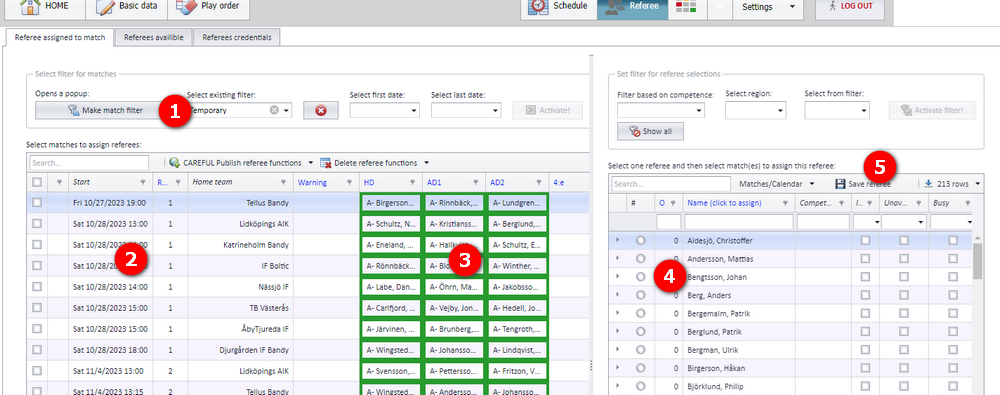
The referee types appear as the role columns in the match list on the "Referee assigned to match" tab (3 in the screenshot under "Assigning a referee to a match: the basics").
Inactive or passive referees are loaded into PL, in case they already have matches, but they are not shown in the list of referees to select from (4 in the same screenshot).
Open the menu "Referee" and the tab "Referee assigned to match".
- Make a filter for the matches you want to assign referees to, with "Make match filter" (1).
- Select one or more matches using the select box in the left column (2). Do not select matches that run in the same time period – a referee cannot referee two matches at the same time.
- Select the column with the referee role you want to assign (3). The role is the type of role the referee shall have in the selected matches.
- Select one referee (4). Struck-through referees are not available and shall be avoided. It is possible to select a referee who is unavailable for personal reasons, but not one who is already assigned to a match.
- Save the referee. TIP: just click on the referee name to fast-assign the referee to the selected matches. Alternatively, tick the referee and press the button "Save referee" (5).
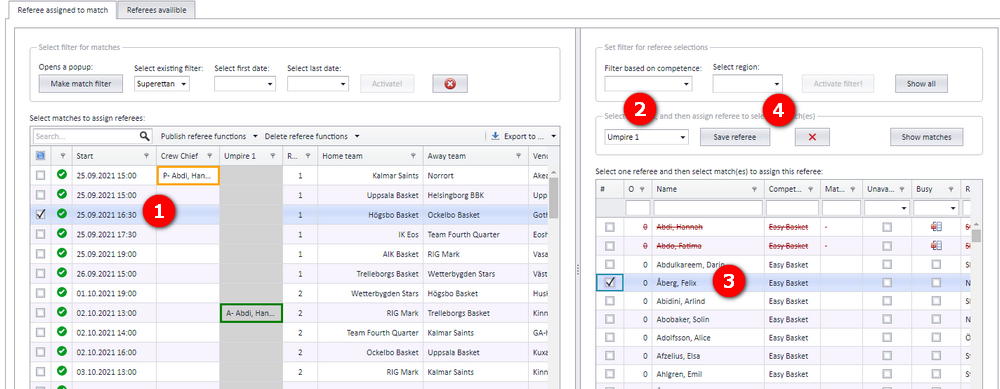
In the second screenshot: (1) the selected match, (2) the role, here "Umpire 1", (3) the ticked referee, with struck-through referees above it, and (4) "Save referee".
An assignment made here is visible in PL only. The referees see the match in their calendar once the assignment has been nominated (see "Nominating, accepting and buy and sell").
A federation administrator ("organisation admin") and a district administrator ("region admin") can give any person a credential to assign referees on the matches of selected leagues.
A person has one credential per league. If a league consists of several levels, the highest credential is set on all levels of that league.
Two credentials on the "Referees credentials" tab give the right to assign referees:
| Credential | UI label | Roles the person can assign |
|---|---|---|
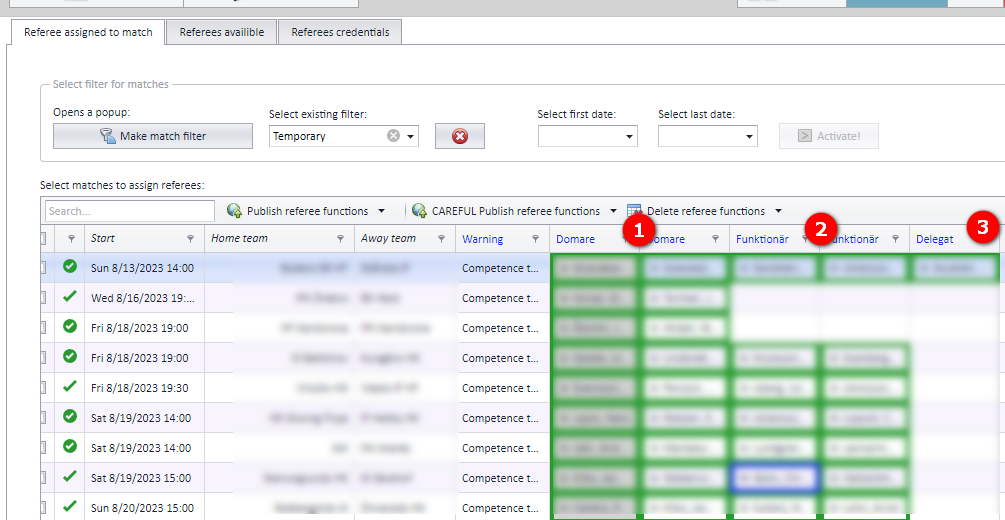
| Referee assigner ("Domartillsättare") | "Referee assigner" | All roles: the "Domare" (referee) columns (1), the "Funktionär" (secretary) columns (2) and the "Delegat" (delegate) column (3) |
| Secretary assigner ("Funktionärstillsättare") | "Secretary assigner" | The "Funktionär" columns (2) and the "Delegat" column (3) only |
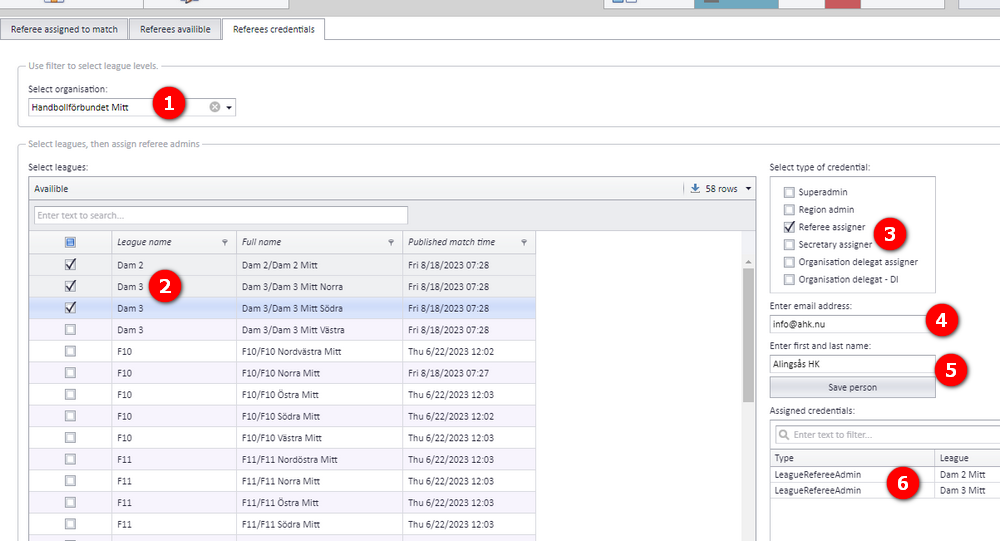
Open the menu "Referee" and the tab "Referees credentials".
- Under "Select organisation", select the region to pick leagues from (1). Depending on your own credential, only certain regions are shown. If you are a federation administrator, all the federation's leagues are also shown.
- Tick the leagues the person shall administrate (2).
- Tick the type of credential under "Select type of credential" (3).
- Enter the email address of the person who shall get the credential to assign match referees (4).
- If the person already exists in Profixio, the name appears. If not, enter first and last name (for example "Jon Christer Dove") (5). Then click "Save person".
- After the email address is entered, all credentials this person has are shown in the "Assigned credentials" list (6).
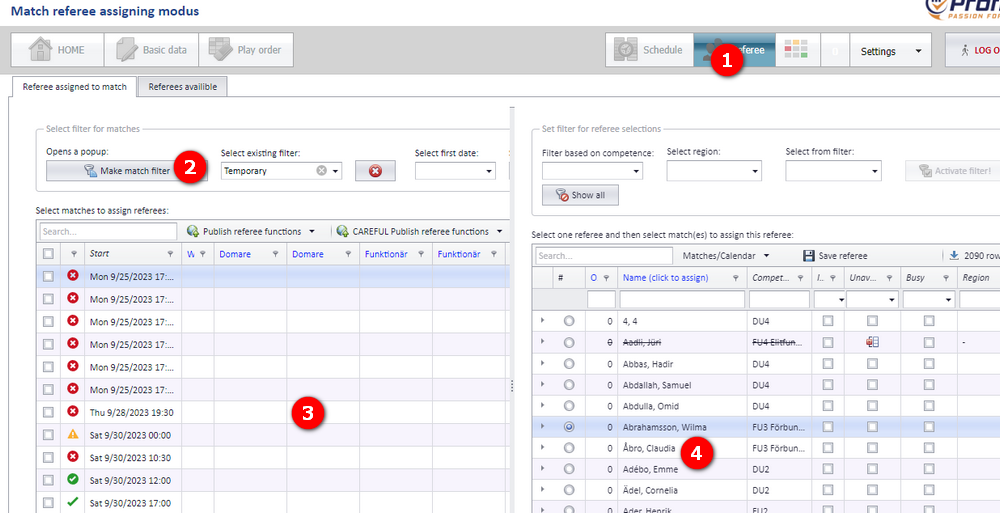
When a person signs in to PL and only has credentials to assign referees, PL opens in "Match referee assigning modus": all menu buttons are disabled except the menu "Referee" (1), and only the tabs "Referee assigned to match" and "Referees availible" are shown.
- The leagues the person has access to are found by clicking the button "Make match filter" (2).
- All matches in the selected filter are then shown in the match list (3). Activate a role by clicking in its column and select a match.
- Click on the referee name (4). The referee is now assigned to that match in the selected role.
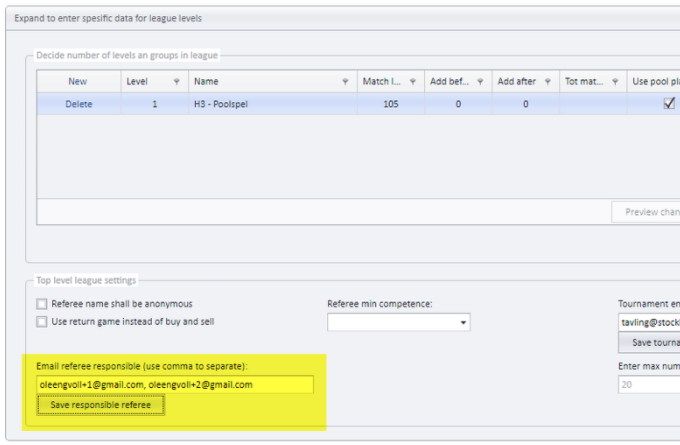
A referee responsible is one or several persons, set by email address on a league. All levels of the league get the same referee responsible(s). The referee responsible is included when a notification is sent because of match changes and/or referee changes (see "Notifications when a match changes").
To enter the referee responsible(s): select the league, open "Expand to enter spesific data for league levels" and fill in the field "Email referee responsible (use comma to separate)" under "Top level league settings". Use a comma to separate several addresses, then click "Save responsible referee".
Swedish basketball
- Referees are updated in PL by importing data from the web referee register, which in turn imports the referees from the Swedish Basketball Federation through an API.
Set per federation in its organisation data
- Whether referees are removed when a match is moved, or follow the match.
- Whether buy and sell is used.
- Whether a referee is accepted directly, without nomination.
- Whether notifications have exceptions.
- Assigning and removing referees on many matches, publishing and deleting referee functions: see "Assigning and removing referees on matches".
- Nominating referees, accepting, and buy and sell of assignments: see "Nominating, accepting and buy and sell".
- Referee groups, referee pairs and the referee calendar: see "Referee groups, pairs and calendars".
- Referee competence, the "Referee min competence" setting and publishing referees: see "Referee competence and publishing referees".
- How PL and the web referee module exchange referee data: see "Keeping PL and the web referee module in sync".
- Notifications sent on match and referee changes: see "Notifications when a match changes".
- Signing in to PL and the other PL permissions: see "Signing in and PL permissions".
Was this page helpful?