Anti teams and connected opponents
Keeping two teams apart with a minimum break (anti teams) or tying a team's matches against a set of opponents together (connected opponents), including the SINTEF definition the schedule calculation follows.
For other roles
Profixio League (PL) has two tools that control how the matches of two related teams are placed against each other in the schedule:
- Anti teams keep two teams apart. You pair two teams and give the pair a minimum break in hours; the schedule then keeps that break between their matches. Anti teams are set up under "Basic data" on the "Teams registred in league" tab.
- Connected opponents do the opposite: they tie a team's matches against a given set of opponents together, so that the team plays those matches consecutively without any other match in between. The rules the schedule calculation follows for connected opponents come from the SINTEF definition on this page.
Both are read by the schedule calculation together with the other restrictions on the league, see the League pages on time restrictions and on preparing and generating the schedule.
Anti teams are made from "Basic data", on the "Teams registred in league" tab, with the button "Make anti teams" on the right-hand side (1).
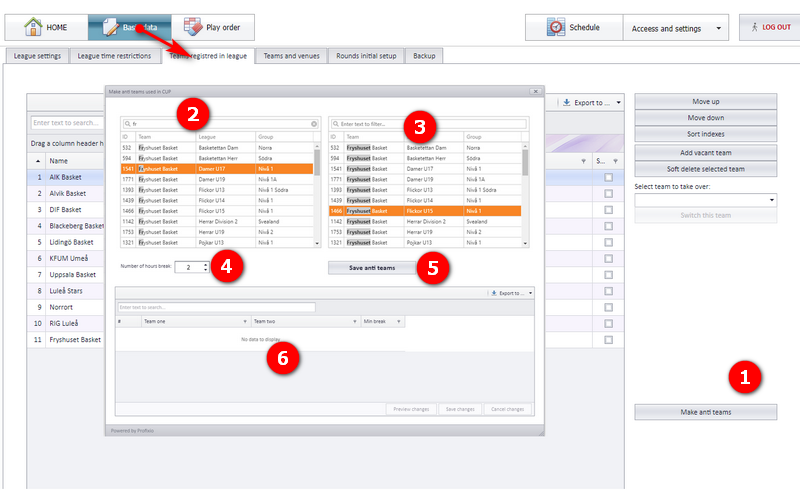
The "Make anti teams used in CUP" dialog shows:
- "Make anti teams" opens the dialog.
- The left team list. Type in the filter box ("Enter text to filter...") to narrow the list, then select the first team of the pair. The list shows ID, Team, League and Group.
- The right team list, with the same filter and columns. Select the second team of the pair.
- "Number of hours break" is the minimum break between the two teams' matches. The screenshot shows the value 2.
- "Save anti teams" saves the pair with its break.
- The grid at the bottom lists the saved pairs with the columns "Team one", "Team two" and "Min break". It has "Preview changes", "Save changes" and "Cancel changes" buttons and an "Export to ..." button. In the screenshot no pairs have been saved yet ("No data to display").
Connected opponents specify a requirement for the team of having one or more connected meetings. A connected meeting consists of several consecutive matches where the team only plays opponents from a given set.
Connected here means that the team does not play any other match in between those matches.
The connected opponents requirement has the following properties. The bracketed notes are from the SINTEF definition and mark which scheduler variant a property applies to.
| Property | What it does | Note from the definition |
|---|---|---|
| A collection of team IDs | Specifies the opponents the team must meet in a connected meeting. | |
| The play type | Home or away. | |
| The number of matches | How many matches shall be played consecutively in one connected meeting. | Cup only; in Pro this is fixed to 2 |
| A maximum duration | The largest allowed difference between the end of the first match and the start of the last match in a single connected meeting. | Optional, Cup only |
| A collection of fixed time ranges | Each range has a start time and an end time. | Optional, Cup only |
If the number of scheduled matches between the team and the opponents is higher than the number of required matches per meeting, the requirement yields multiple connected meetings.
If the number of scheduled matches is not a multiple of the required number of matches in a connected meeting, then all but one of the meetings must respect the number, and only one of the meetings is allowed a lower number.
If fixed time ranges are specified, each time range shall have at least one connected meeting.
- If there are fewer connected meetings than time ranges, each meeting must lie in a different range.
- If the number of connected meetings is equal to or larger than the number of specified ranges, each range must have at least one connected meeting.
- If each range has a connected meeting, the remaining additional connected meetings are not restricted in time.
The connected opponents check ensures that for each team all connected opponents requirements are respected:
- In each connected meeting the team must only play teams from the connected opponent requirement.
- The connected meetings must obey the number of matches in a meeting, with the one-meeting exception described under "How connected meetings are counted".
- If a time range or a time frame (maximum duration) is provided for the connected meetings, this must be respected.
Note: unscheduled matches are ignored by this constraint.
- Time restrictions on the season, the league and single teams: see "Time restrictions for season, league and teams".
- Play order and playkeys: see "Play order and playkeys".
- Running the schedule calculation itself: see "Prepare and generate the schedule".
- Adding, replacing and vacating the teams that appear in the anti-team lists: see "Teams in a league" and "Vacant teams".
Was this page helpful?