Deleting matches and reading the action log
Deleting single matches in PL or only in the app, what happens to a deleted match, the other functions under "Match functions", and using the action log to see who changed what and when.
Looking for something else? Applying to move a series match Replacing, deleting and moving a team Vacant teams
For other roles
A match can be deleted in PL no matter the status of the match. If the match is not published, there are no consequences to consider.
If the match is already published to the app, deleting it has consequences for the people involved and for the app — see "What happens after a match is deleted" below before you delete.
- Tick the checkbox on the row of the match you want to delete. You can tick several matches.
- If you want to delete the match both in PL and in the app, use "Radera vald(a) match(er)" (delete selected match(es)).
- If you only want to delete the match in the app, use "Radera vald(a) match(er) endast i APP" (delete selected match(es) only in the app).
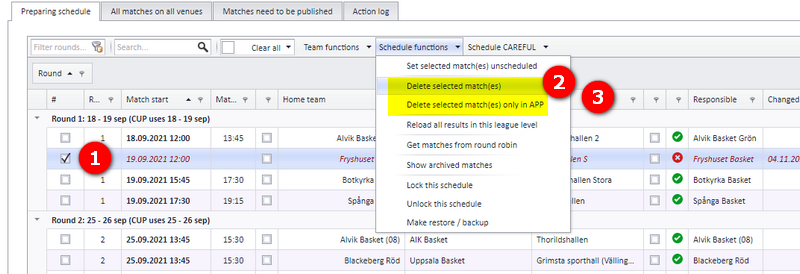
- A deleted match is saved into the archive system. It is possible to restore the match data from there.
- If the match is deleted only in the app, the match remains unchanged in PL regarding date, venue, teams and responsible club. It is no longer published to the app.
- Involved persons are notified if the match exists in the app. See "Notifications when a match changes" for who receives what.
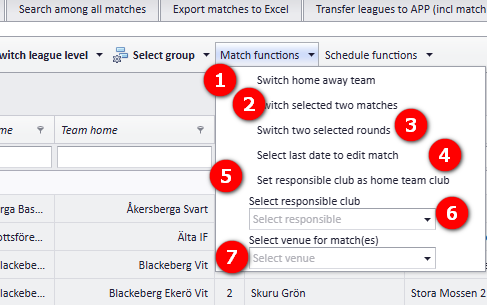
In order to make changes based on a match, use the menu "Match functions". The numbers refer to the screenshot below.
- Switch H/A.
- Switch two matches.
- Switch two selected rounds.
- Select last date to edit match.
- Set responsible club as home team club (on selected match(es)). The home team club is set as responsible club only if responsible club is missing. If the home team club is vacant, responsible club is not set.
The main reason for the action log is the possibility to see what has been changed and when. That makes it possible to understand the reason for a change.
Nearly all actions when a match changes are to be found in the "Action log". In addition, actions regarding notifications, referees and publishing to the app are saved in the log.
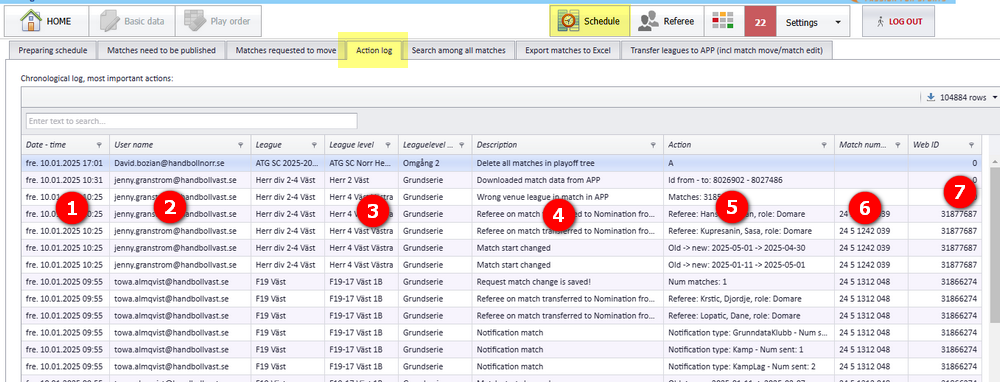
Each line in the action log has these columns. The numbers refer to the screenshot below.
- Date and time when the action was logged.
- The user who was logged in when the action was saved. For changes made in the app, see "Match changed in the app".
- The name of the league, league level and group the action belongs to.
- Description of the action. There are about 30 different actions that are logged.
- Action — a more detailed description of the action.
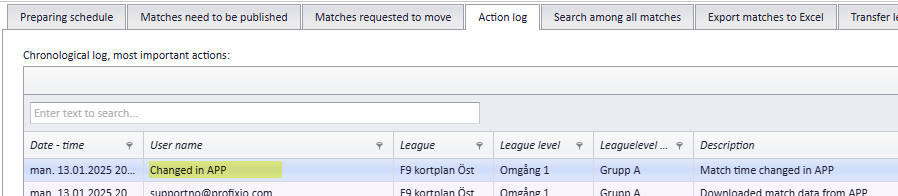
Some actions are saved automatically when PL receives updated data from the app. For example, if a match time is changed in the app, PL updates the match with the new time, and this update is also shown in the action log.
If someone has changed a match in the app, the app user is fetched and shown as the user in the action log. If it is impossible to detect who made the change, the user name is set to "Changed in APP".
- Changing a match's date, time, venue or teams instead of deleting it: see "Changing a match date, time, venue and teams".
- Who is notified when a match is changed or deleted in the app: see "Notifications when a match changes".
- The archive and backup functions in the PL workspace, where deleted matches end up: see "The PL workspace, grids, archive and backup".
- Publishing matches to the app: see "Publishing the schedule".
- Replacing, deleting and moving whole teams, and vacant teams: see "Replacing, deleting and moving teams" and "Vacant teams".
See also
Was this page helpful?