Editing a playoff match
Editing, adding and deleting playoff matches in the PL playoff tree, setting a team as the winner or loser of another match, removing a team from the playoff, and split matches with how their winner is calculated.
For other roles
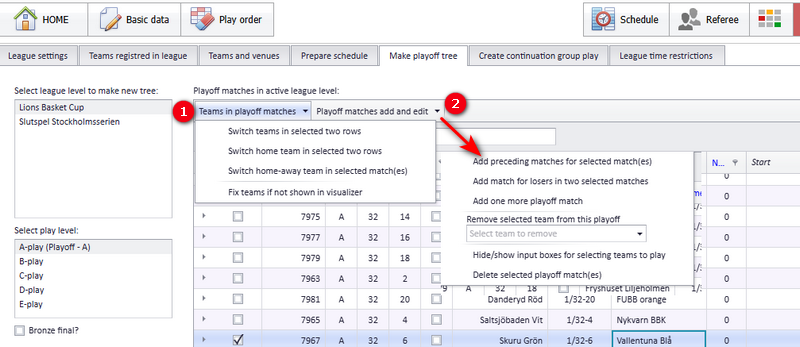
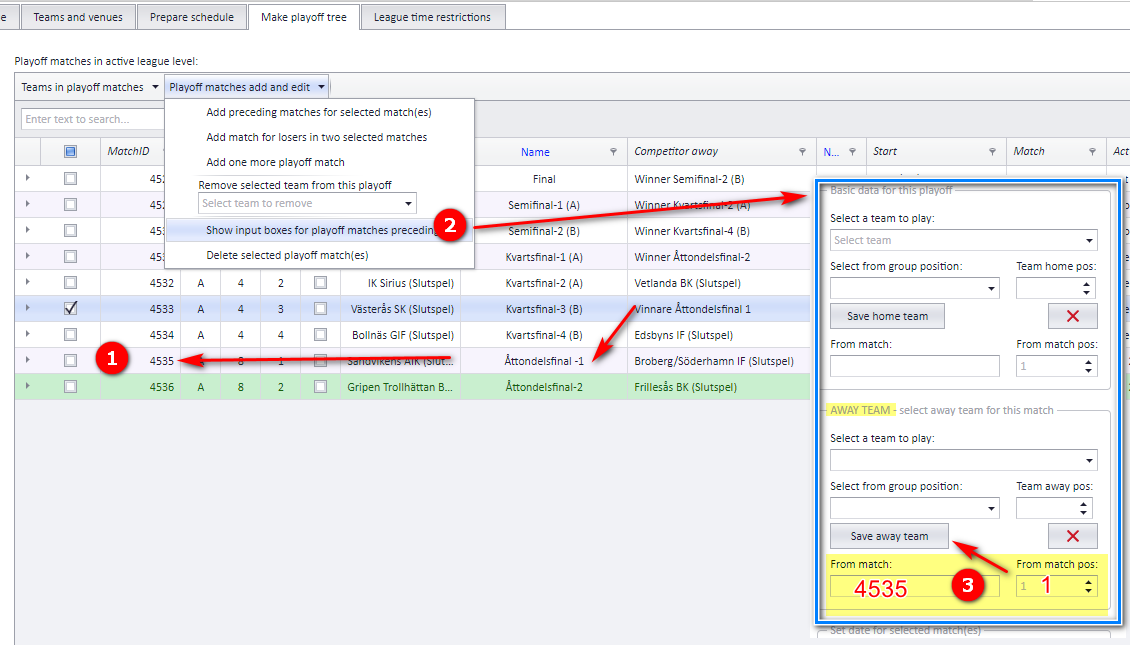
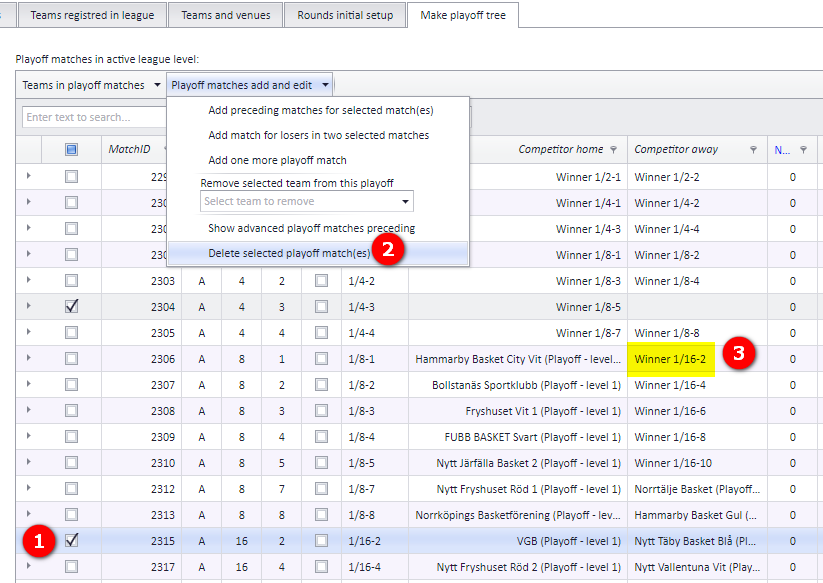
Playoff matches can be edited after they are made. All the editing functions are found in the playoff match menu in the playoff tree window, as shown in bubble 1 and 2 in the screenshot. In the Swedish version of PL the menu is called "Lägg till och redigera slutspelsmatcher" (add and edit playoff matches). The functions in the menu are:
- Add preceding matches for selected match(es)
- Add match for match losers from two selected matches
- Add preceding home or away team for a match
- Remove selected team from this playoff
- Show advanced playoff matches preceding
- Delete selected playoff match(es)
Each function has its own section on this page. Adding an extra playoff match to an already scheduled playoff is done from a separate menu, "Add one more playoff match".
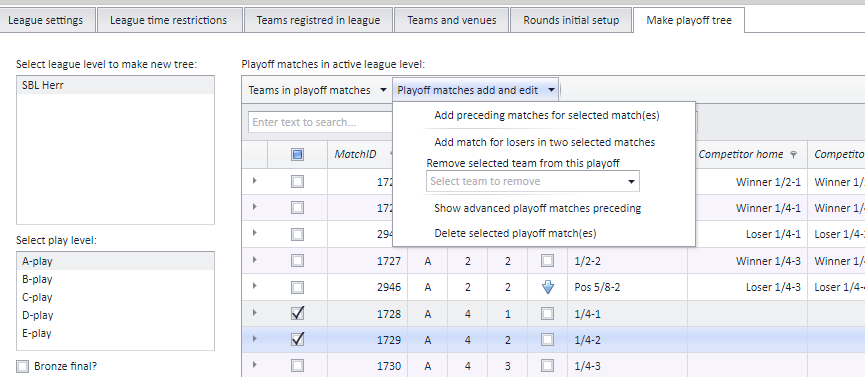
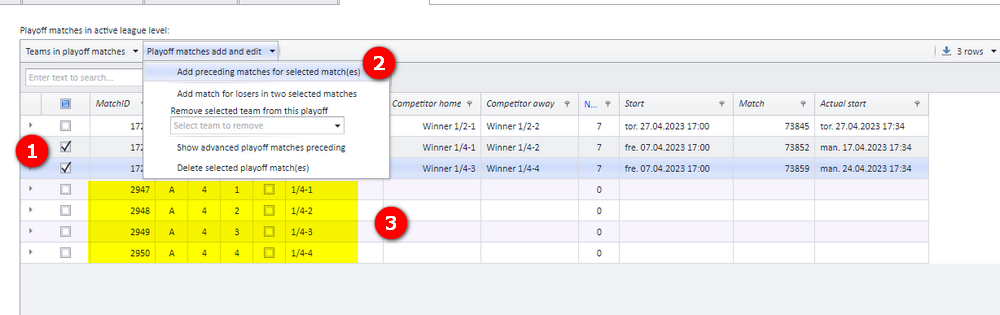
Use "Add preceding matches for selected match(es)" (Swedish: "Lägg till föregående matcher för valda matcher") to build the round before the matches you select.
- Select the match or matches you want to add preceding matches for.
- Open the playoff match menu and click "Add preceding matches for selected match(es)".
- If you select both semi-finals, as in the example, you get 4 quarter-finals.
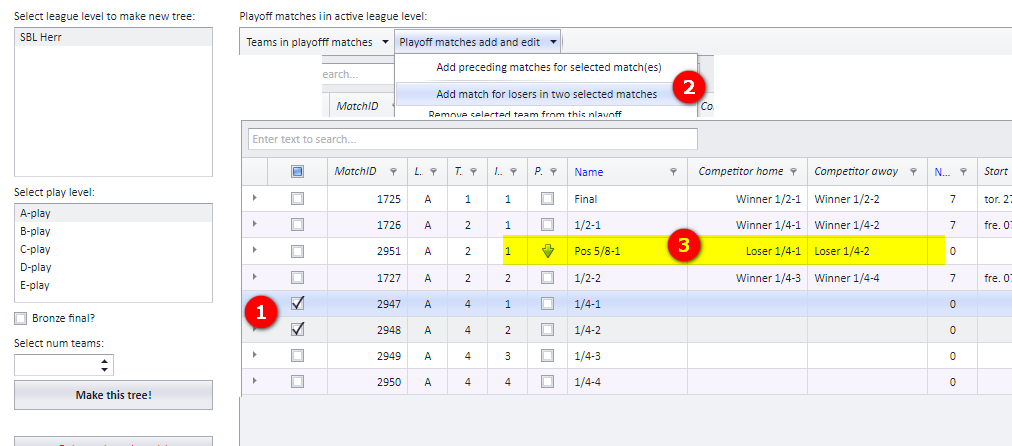
Use "Add match for match losers from two selected matches" (Swedish: "Lägg till match för förlorarna från två valda matcher") to create a match between the losers of two matches.
- Select exactly two matches.
- Open the playoff match menu and click "Add match for match losers from two selected matches".
- The resulting match is shown in the table.
You can set the home or away team of a playoff match to be the winner or loser of another match, identified by its match id. The other match can be in another league level than the playoff match.
Example: you have a 1/4-final and you want the away team to be the winner of the first 1/8-final.
- Find the id number of the 1/8-final (in the example 4535).
- Open the playoff match menu and click "Add preceding home or away team for a match" (Swedish: "Visa inmatningsrutor för föregående slutspelsmatcher", show input boxes for preceding playoff matches). A dropdown and spin boxes appear for the home and away team of the selected match.
- Select which match the team shall come from by entering its id number.
- Select the position: 1 = winner, 2 = loser.
- Click "Save" (Swedish: "Spara").
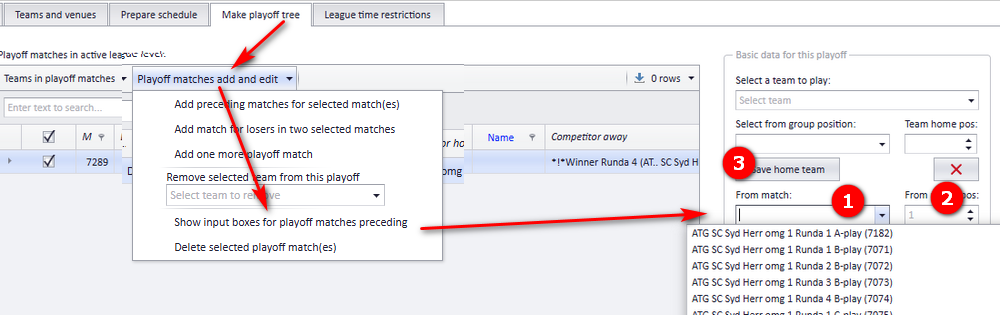
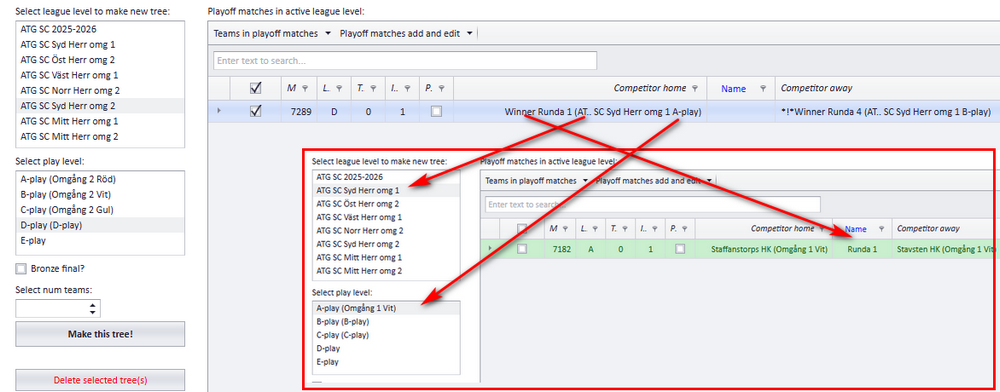
Example with another league level: a match in league level ATG SC Syd Herr omg 2 where the home team shall be the winner of match "Runde 1" in ATG SC Syd Herr omg 1, A-play.
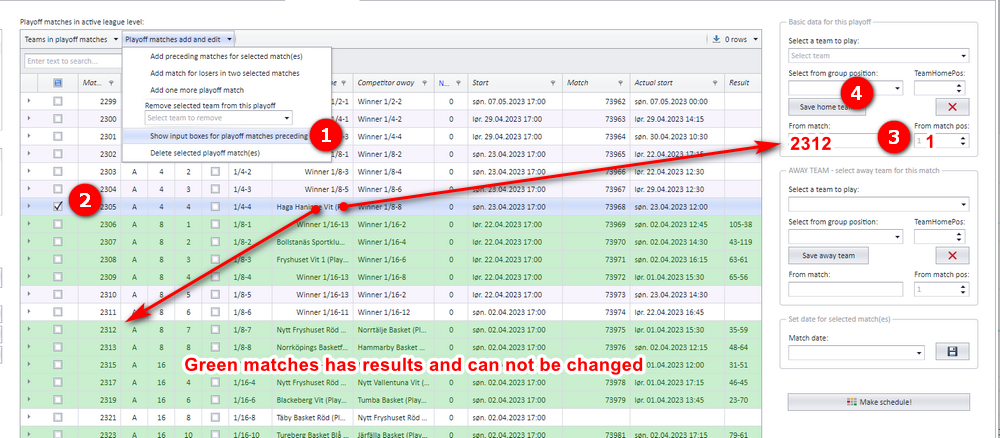
Another example: the team shall be the winner of match 1/8-7, which has match id 2312. Select the match in the grid, enter 2312 as the match number and 1 as the position, then click "Save".
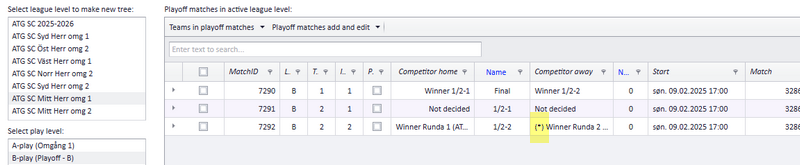
The app moves the correct team into the playoff match once the match the team comes from is published. Until that match is published, the team is shown with an asterisk in front of its name.
"Show advanced playoff matches preceding" (Swedish: "Visa avancerad vy för föregående slutspelsmatcher") turns on extra input boxes on the rows in the playoff tree, so you can correct where each match takes its teams from:
- A new box for entering match id / match position for the home team.
- A new box for entering match id / match position for the away team.
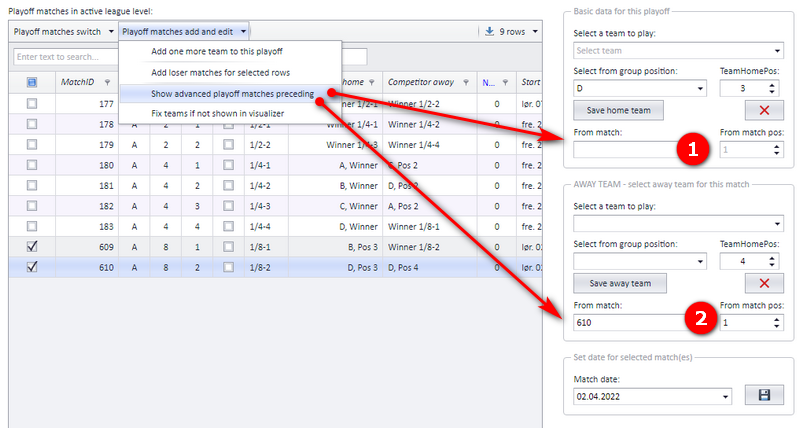
To correct a preceding match, for example after adding a playoff match:
- Open the playoff match menu and click "Show advanced playoff matches preceding".
- Select the row you must change to get the tree correct.
- Enter the home team data...
- ...and/or the away team data for this preceding match.
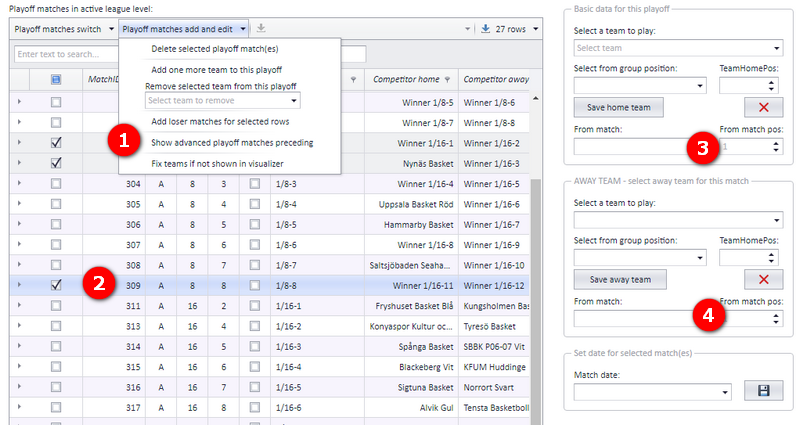
It is the app that works out which team goes on to which playoff match. When the result of a match is set in the app, the app calculates all the teams that shall be filled into other matches based on that result: when match (1) has a result, the team in match (2) is calculated. PL shows the new teams every time a user belonging to the organisation opens the "Schedule" window, no matter which user.
When a team is filled in this way:
- The responsible club of the match is set from the home team's club.
- The home venue of the match is set from the home team's venue in the playoff match only if no venue is set in PL, or the venue in PL is a temporary venue. A venue already set in PL is kept. If PL and the app have different venues, the venue is marked as a mismatch.
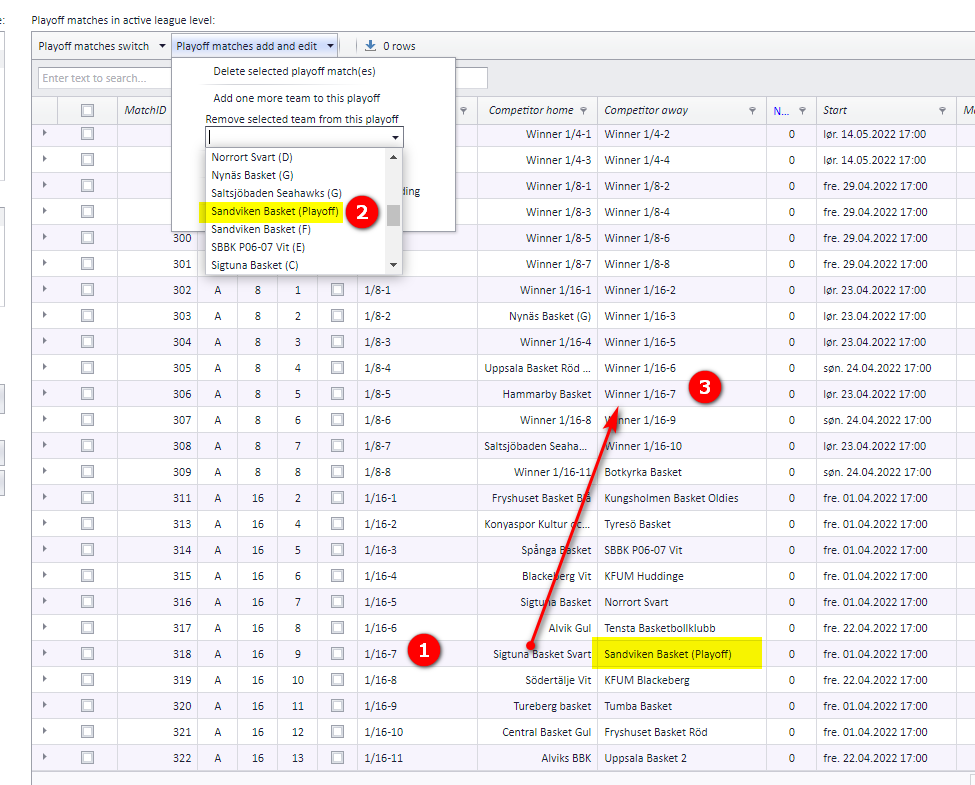
"Remove selected team from this playoff" (Swedish: "Ta bort valt lag från detta slutspel") takes a team out of the playoff tree. Removing a team from a playoff is not the same as deleting the team: the team is still available for later use in the playoff if necessary. To update the app, the playoff must be published afterwards.
- Find the match with the team that shall be removed. You do not need to select this row.
- Open the playoff match menu and select the team to remove in the dropdown under "Remove selected team from this playoff". A team can show up several times in the dropdown, once for each league level it plays in. You must select the team with the same league level as the team in the match row.
- The removed team is deleted from the playoff match, and the opposing team is moved further up in the playoff in the same way as if it had won the match against the removed team (for example "Winner 1/16-7").
- The match that is left with no teams (in the example 1/16-7) is removed.
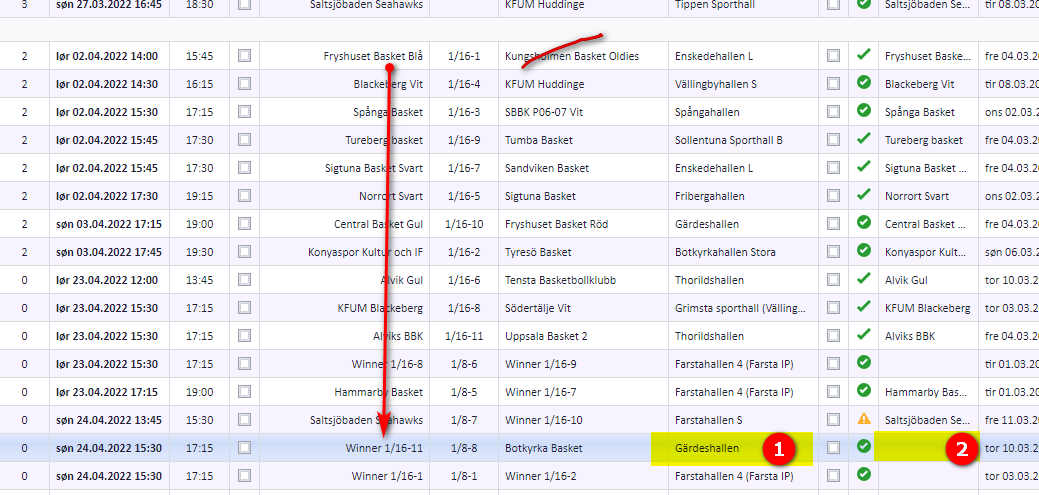
In the picture below, "Kungsholmen" is removed from match 1/16-1, so "Fryshuset" is moved to match 1/8-8 as the home team.
- The venue does not change, since the match is probably already scheduled.
- The home team is set as the responsible team.
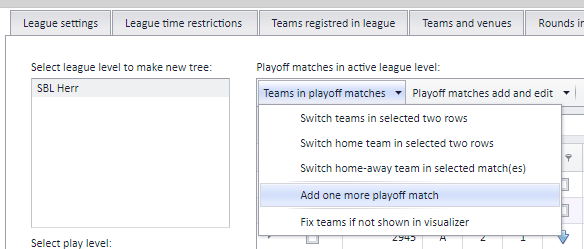
If a playoff is already scheduled and you want to add a match, use the menu "Add one more playoff match" (Swedish: the menu "Lag i slutspelsmatcher", teams in playoff matches, and then the button "Lägg till ytterligare slutspelsmatch"). You can add several matches, but only one at a time, and after each added match you decide manually who takes part in it.
There is a video with Norwegian speech: https://www.screencast.com/t/ubwIDZrT
Example: you have 8 teams in your playoff and want to add two teams. Then you must add one more playoff match.
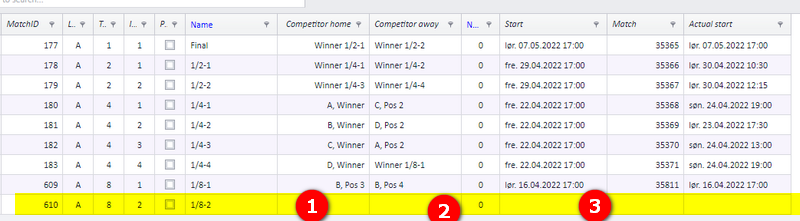
- Click "Add one more playoff match". A new row appears in the grid.
Now adjust the playoff manually on the new row:
- Enter the home team and...
- ...enter the away team in the usual way.
- Enter the start time of this match.
When these three things are done, a real match can be made from the playoff match; see "Making a real match from a playoff match". If the new match changes where other matches take their teams from, correct those rows with "Show advanced playoff matches preceding"; see "Advanced view of preceding matches".
A playoff match is not seen directly in the schedule: it is just a match representing the playoff tree. To make a real match in the schedule from it, select the playoff match and click the button "Make schedule" (Swedish: "Skapa spelschema").
When you select one or more playoff matches and click "Make schedule", existing matches are not deleted or changed.
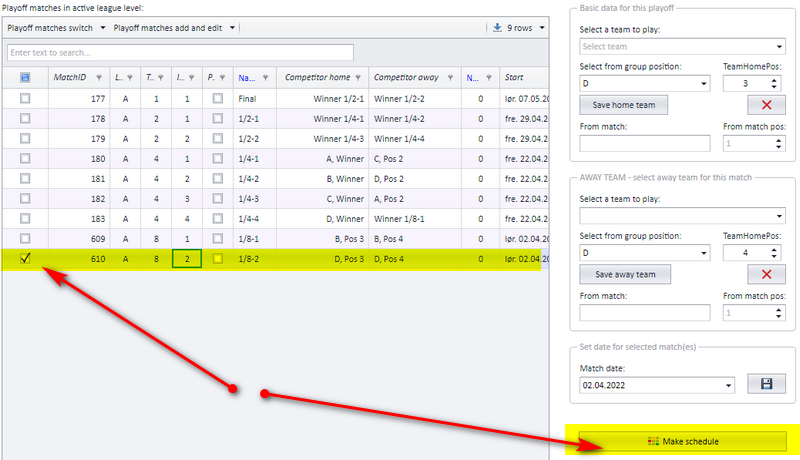
A playoff match can be deleted whenever you want as long as it has not been played, that is, as long as it has no result. Deleting has consequences for the rest of the tree; see "What deleting a playoff match does to the tree".
- Select the match you want to delete.
- Open the playoff match menu and click "Delete selected playoff match(es)" (Swedish: "Radera vald(a) slutspelsmatch(er)").
- After deleting, the playoff match is gone, and no team is shown in the match that depended on the deleted match.
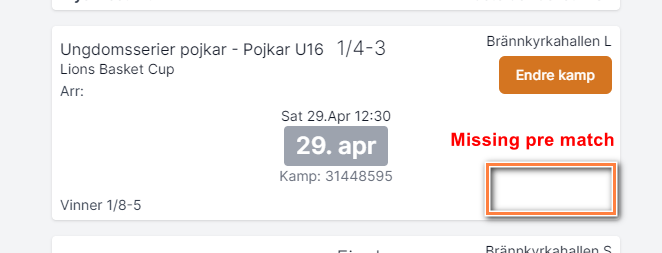
Every match in a playoff must have a winner, because the app calculates the following matches from the winners. What a deleted playoff match leaves behind depends on how far it had come:
| The deleted playoff match was... | What happens |
|---|---|
| Not scheduled (no real match made) | The depending match is missing its home or away "team". Example: if playoff match 1/16-3 is deleted, the depending playoff match 1/8-1 (home team 1/16-2, away team 1/16-3) lacks the away "team". |
| Scheduled but not published to the app | As above, plus the depending "team" in the scheduled match is also deleted. The scheduled match is then set as invalid. |
| Scheduled and published to the app | As above. The match in the app stays as it was until the schedule is published again, and publishing that match to the app only results in a missing team in the match. |

Split matches (Swedish: "slutspelsserie") are matches where the same two teams play each other a number of times. The summary of these matches decides who the winner is. How the summary is calculated depends on the situation, and all the calculation is done in the app; see "How the winner of a split match group is decided".
To make split matches, enter the number of matches in the column "Num rounds" in the playoff tree. This can be done before or after matches are made in the schedule. The split matches are created when you click the button "Make schedule". All matches in the same tree level, for example the 1/4-finals, have the same number of matches.
The first match is the parent match and the others are child matches connected to it. To see the included matches, expand the detail row in the grid. -1 in the grid indicates the parent match; the rest of the matches are connected to this parent match by a code. In the ordinary Schedule window, the split matches show up as ordinary matches.
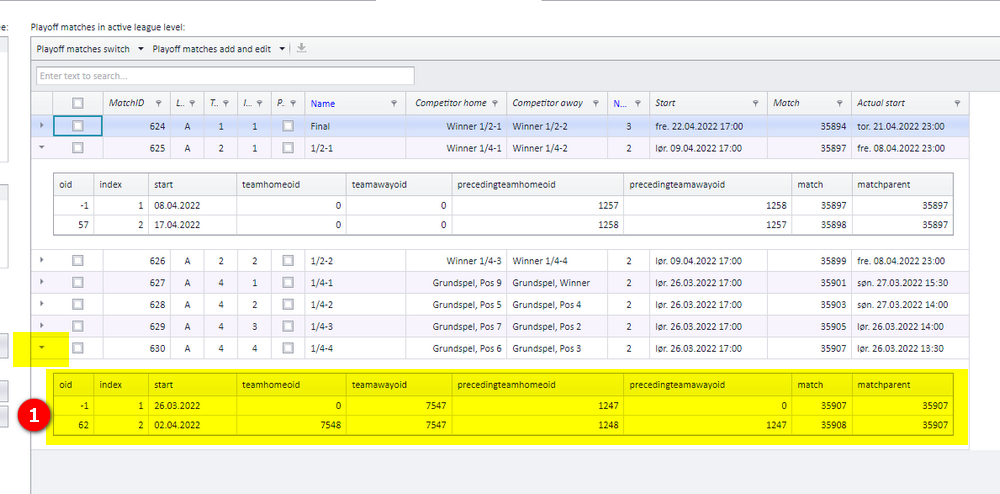
The parent split match is always shown in the playoff tree grid; the child matches are shown when you expand the parent match row. Parent and child matches are switched from different windows.
Parent match:
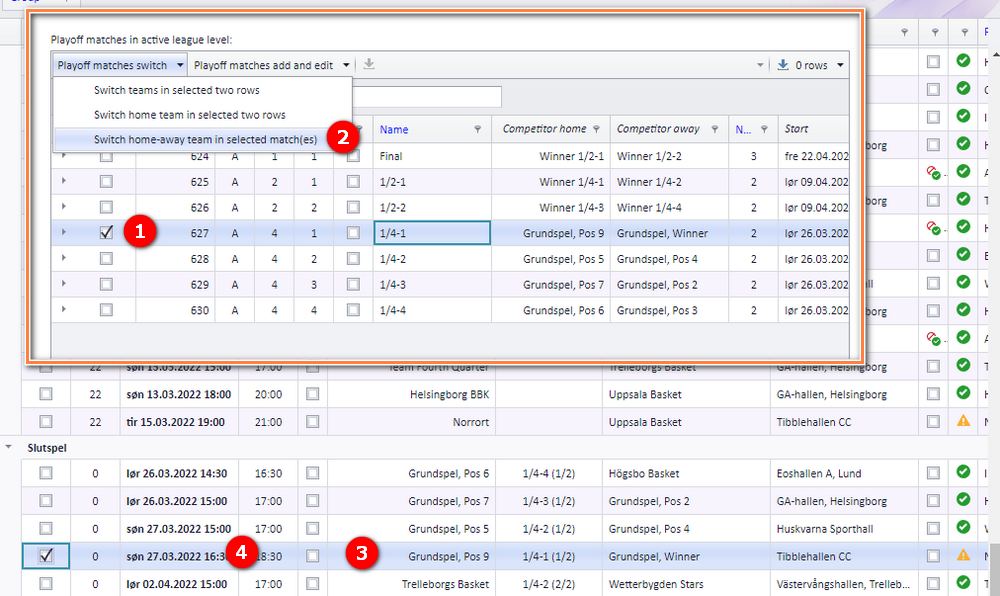
- In the window "Make playoff tree" (Swedish: "Skapa slutspelsträd"), select the match...
- ...and click "Switch home-away team.." (Swedish: "Skifta hemma- och bortalag"). The grid updates and shows the correct home and away team.
- In the menu "Schedule" (Swedish: "Spelschema"), the grid shows the switched teams in the corresponding match.
- The date is shown in normal font (not bold), and the match must be published before the switched teams are shown in the app.
Child match:
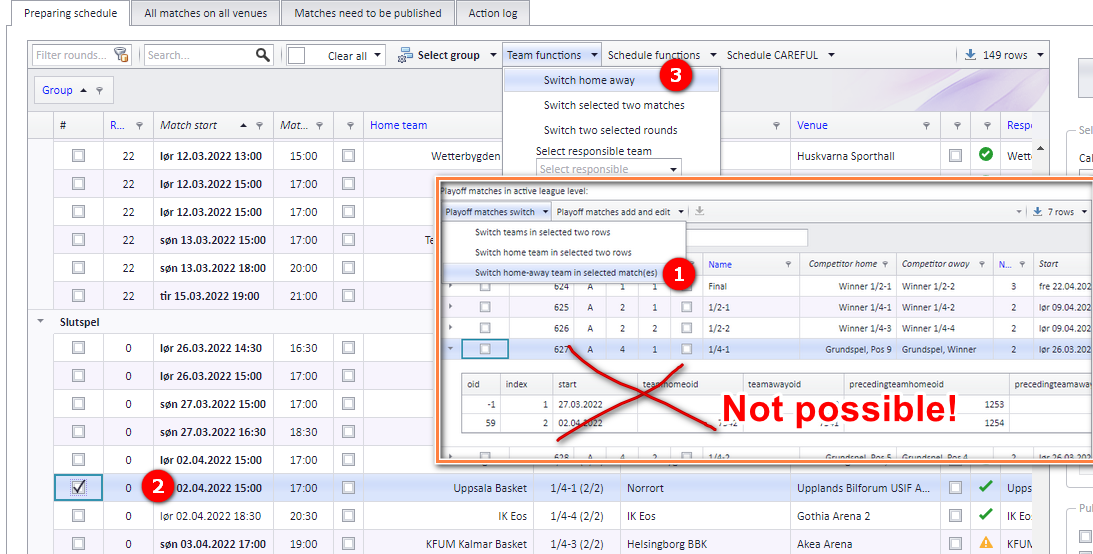
- A child match is switched from the window "Schedule", not from the window "Playoff tree".
- Select the row with the match...
- ...and click "Switch home-away" (Swedish: "Byt hemma-borta"). The grid updates and shows the correct home and away team.
- The date is shown in normal font (not bold), and the match must be published before the switched teams are shown in the app.
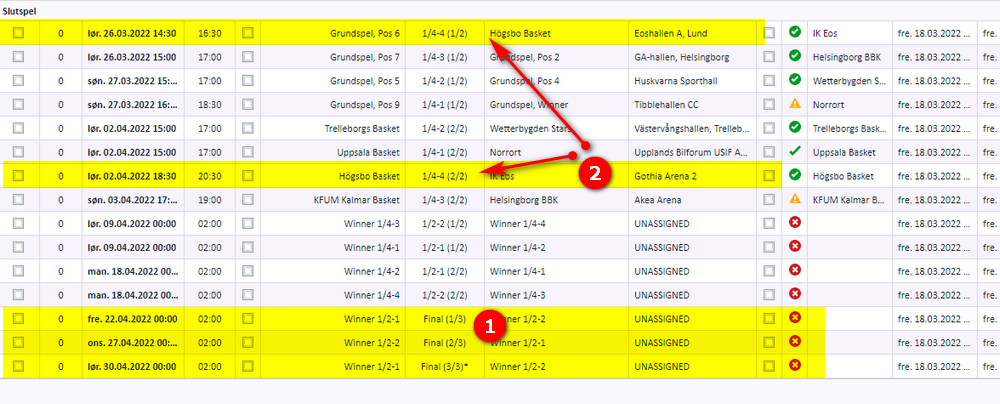
Split matches are numbered like 1/4-1 (1/3): this is the first match of 3 in this split. The index always follows the match time, so index 1 is always the match with the earliest start time.
It is the app that calculates which team shall play in the playoff and go on further in it, and the calculation is done at the moment a user saves a match result. Split match groups can only be used in a playoff, so only playoff matches are considered. The winner of a split match group is calculated as follows:
- Number of wins. From the total number of matches in the group, the number of wins that decides a winner is found. With a total of 5 matches in the split match group, a team that has won 3 matches is the winning team.
- Goals scored. If both teams have won 2 matches and the fifth match is a draw, the total number of goals decides the winner.
- If the number of goals is equal too, the winner must be decided by drawing lots.
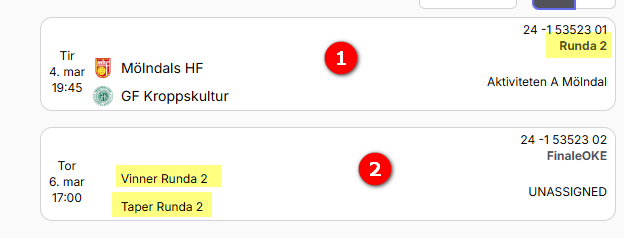
Until the stage the teams come from is finished, the playoff matches show where the teams are calculated from, for example "Winner group B". When it is finished, the real teams show up in the grid.
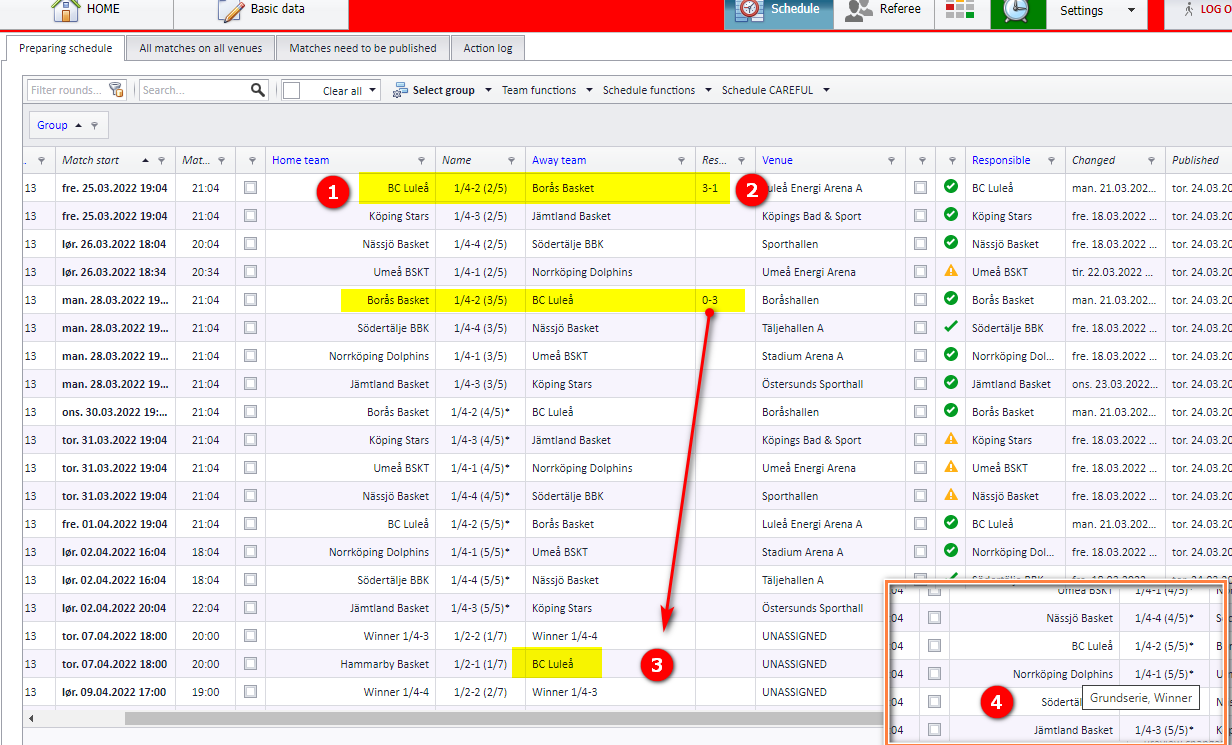
- In the example, BC Luleå has won 3 matches against Borås in their split match group.
- The result is also shown in this grid, but it can only be changed in the app.
- BC Luleå is filled in further up in the playoff, because it is now calculated as the winner of its split match group.
- A tooltip shows which position the team is coming from.
- Building the playoff tree in the first place, including the number of teams and tree levels: see "Building a cup or playoff tree".
- Feeding group winners and runners-up into the playoff: see "From group play to playoff".
- Changing the date, time, venue or teams of an ordinary scheduled match: see "Changing a match date, time, venue and teams".
- Deleting scheduled matches and reading the action log: see "Deleting matches and the action log".
- Publishing the schedule to the app: see "Publishing the schedule".
- Venues and team home venues: see "Venues and team home venues".
- Standings and ranking criteria for group play: see "Standings and ranking criteria".
Was this page helpful?