Going from group play to playoff
Preparing the playoff after the groups are done in Profixio League: making a playoff level or ticking "Has playoff", making playoff groups and assigning teams to them, two worked examples, and registering new teams straight into the playoff.
For other roles
Each league in Profixio League (PL) consists of one or more league levels. When to make several levels is explained on the page "League levels and groups".
A playoff can be made in one of three ways:
- as a new level of its own,
- directly included in an existing level, by ticking "Has playoff" on that level, or
- as a combination of the two: a new level that holds both the group play and the playoff.
The section "Worked example: two groups, then a playoff for all teams" on this page shows the combination of "New level" and "Has playoff" from start to finish.
Make a playoff level when the playoff should be a level of its own (this is not needed when the playoff is included in an existing level with "Has playoff").
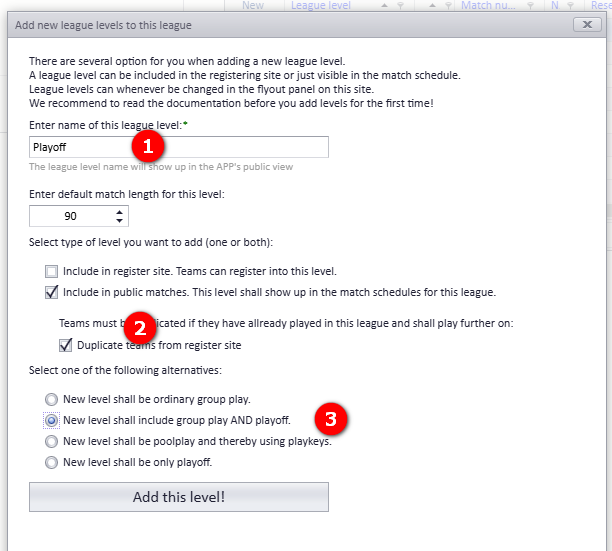
- Click the button to make a new league level. Enter "Name" and "Match length" (1).
- Select "Included in public matches" and "Duplicate teams from register site" (2).
- Select "New level shall include group play and playoff" (3). If this new level shall only include the playoff (no group play), select the last option in the list: "New level shall only be playoff".
After the level is made:
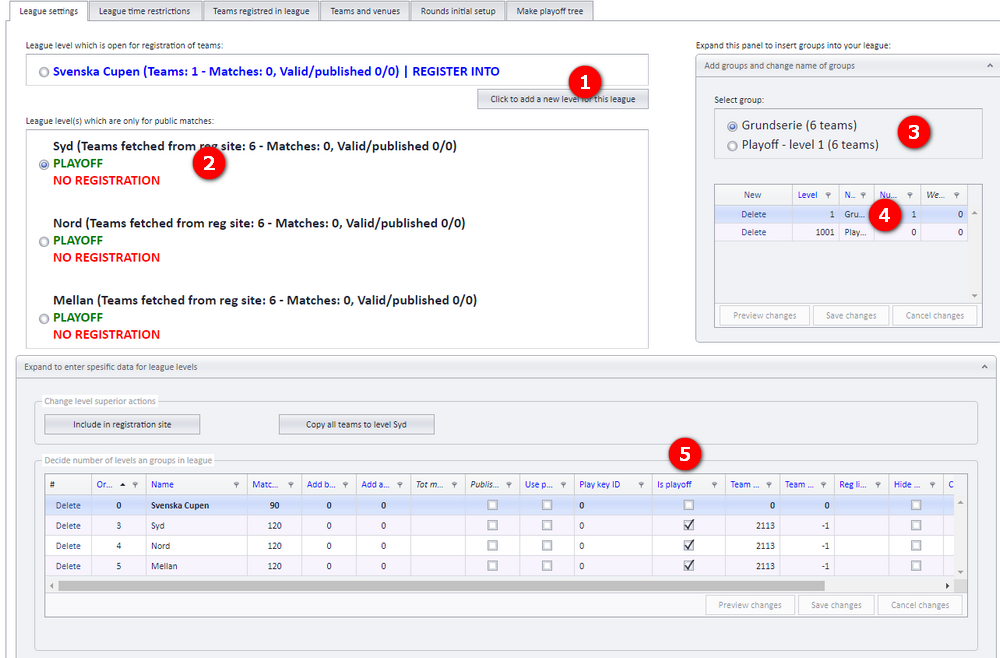
- Activate the playoff level.
- When playoff for a league level is activated, it shows up in the list of "Groups".
- Enter the detail data for the groups. You can add more groups with the "New" button.
- The column marked (4) shows whether the level is a playoff level.
When the playoff starts with group play, make the groups under the playoff level:
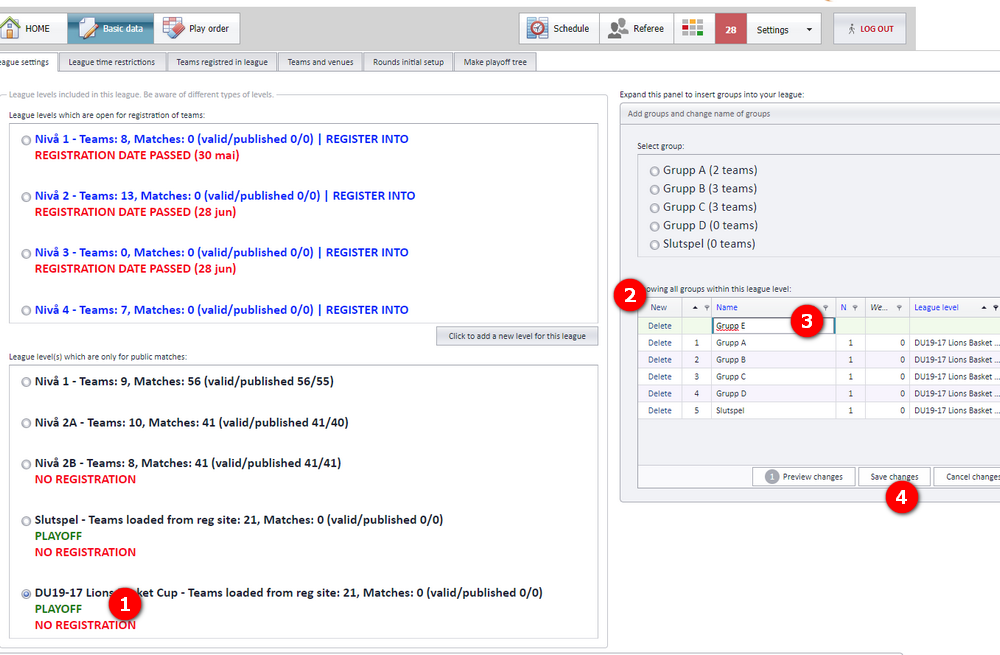
- Ensure you have chosen (activated) the correct playoff.
- Click the "New" button to add a group.
- Enter the name of the group. That is all.
- Click "Save changes".
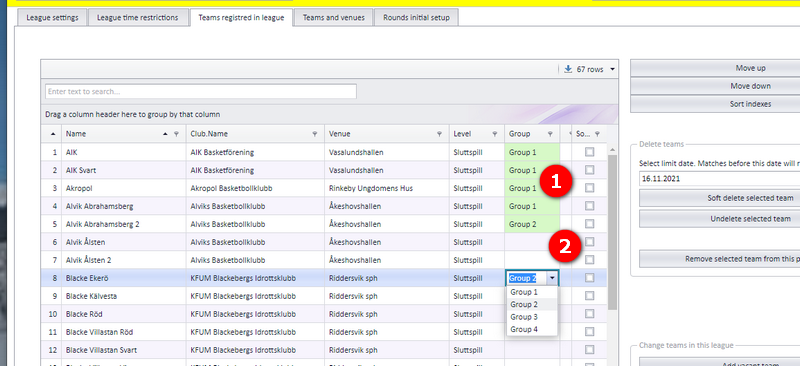
All teams are copied from the registration site, but no team is assigned to a group by default. Teams that shall participate in the playoff group play must be assigned to a group.
Open the tab "Teams registred in league".
- Select the group from the dropdown menu for each team, and click "Save changes" when finished.
- Teams without a group are not included in further scheduling.
Nordic Cup - Men U20 (public page: https://www.profixio.com/app/leagueid15745):
- 6 teams divided into 2 groups, Group A and B.
- They first play each other once.
- Then they play a playoff that includes all 6 teams.
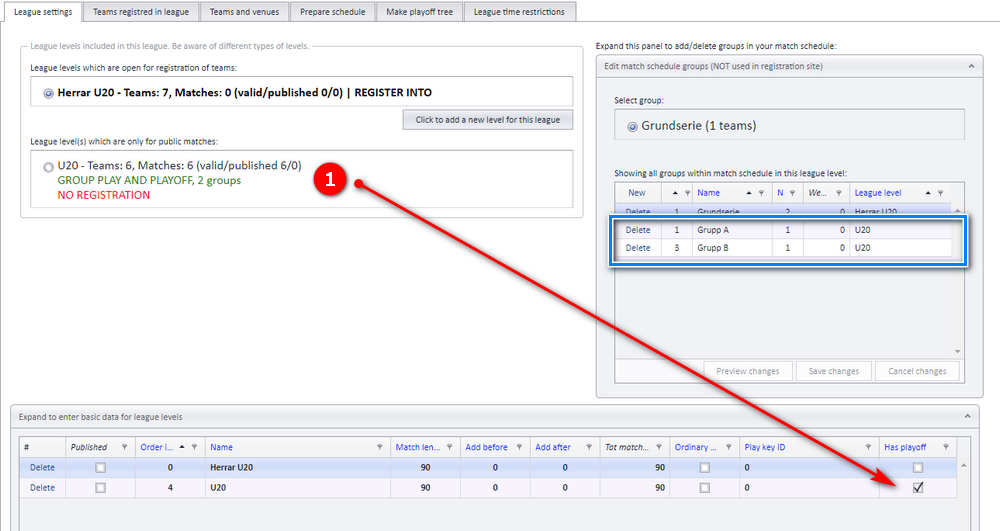
League settings. Make a new league level and name it "U20". Set this level to "Has playoff". Make two groups, named A and B.
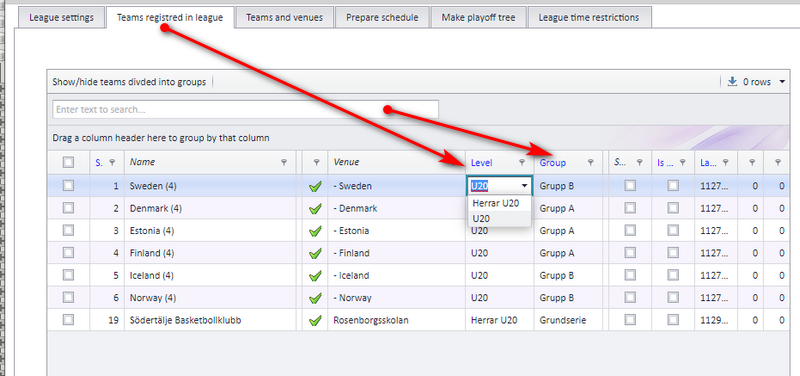
Move the teams into the correct level and group.
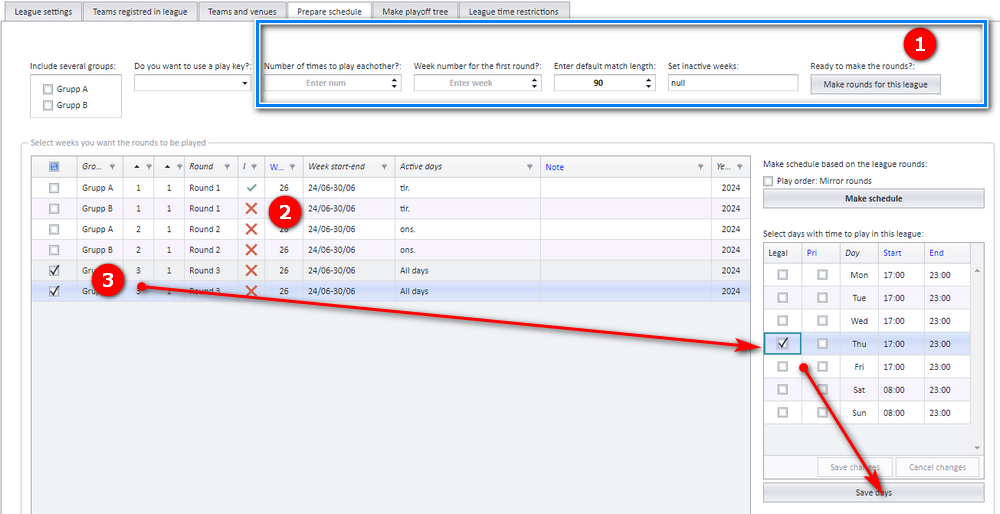
Make the rounds. Use "Prepare schedule" to make the rounds:
- First, make the rounds.
- Then set the correct week numbers. It does not matter if the warning symbol turns into a red cross.
- Last, select play dates for each round, if you wish.
Now you can make the matches: click "Make schedule".
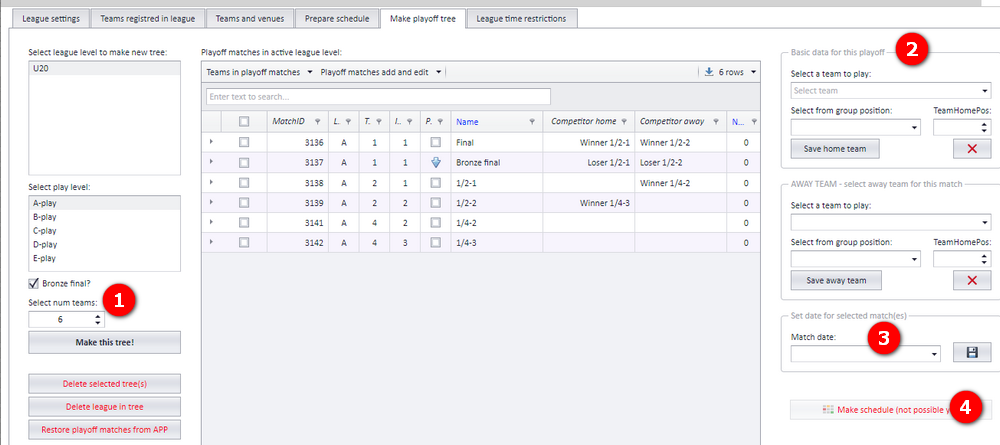
Make the playoff.
- First, make the tree based on the number of teams.
- Then assign who plays whom in each match.
- Set match dates for the matches.
- At the end, make the matches by clicking "Make schedule".
The Swedish volleyball federation (SVBF) runs "Division 1 Herrar" followed by a "Playoff Grand Prix". This playoff has no group play from the start.
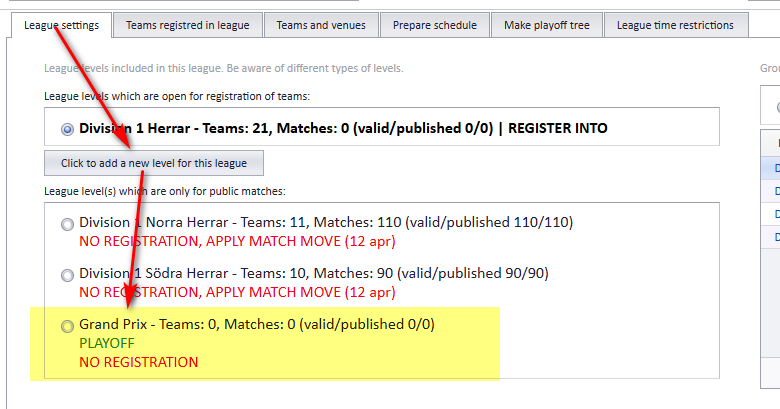
Make a new level. Make a new level called "Grand Prix" and set it as "PlayOff".
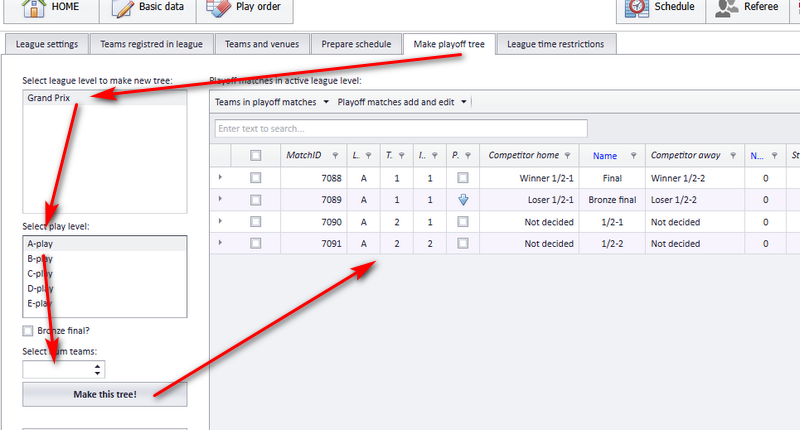
Make the playoff tree. There is no need to duplicate the teams that shall play in the playoff. Just open "Make playoff tree". In this example, 4 teams participate in the playoff.
By default, teams registered in a league level can be copied to any new league level, typically the playoff. You can also open the playoff level for registration on the registration site, so that new teams are registered directly into the playoff.
Teams registered in this way do NOT show up in any other league level.
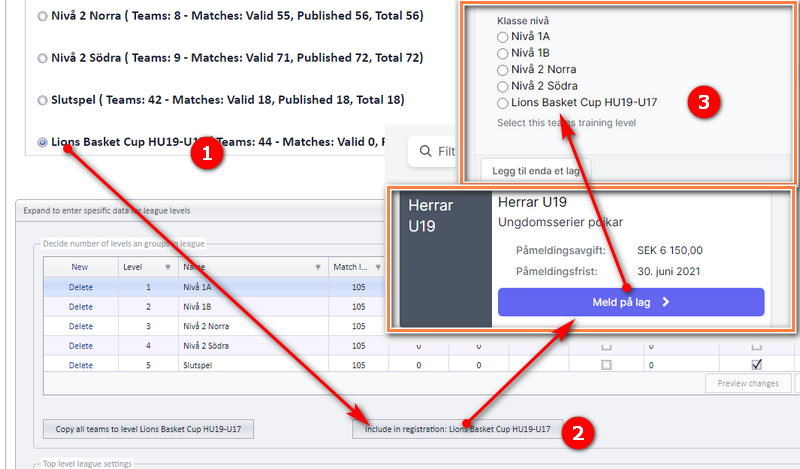
Add a registration site for the playoff
- Activate the playoff level.
- Click the button marked (2) in the picture below.
- A new league level is now shown on the registration site, which makes it possible to register new teams into this specific league level.
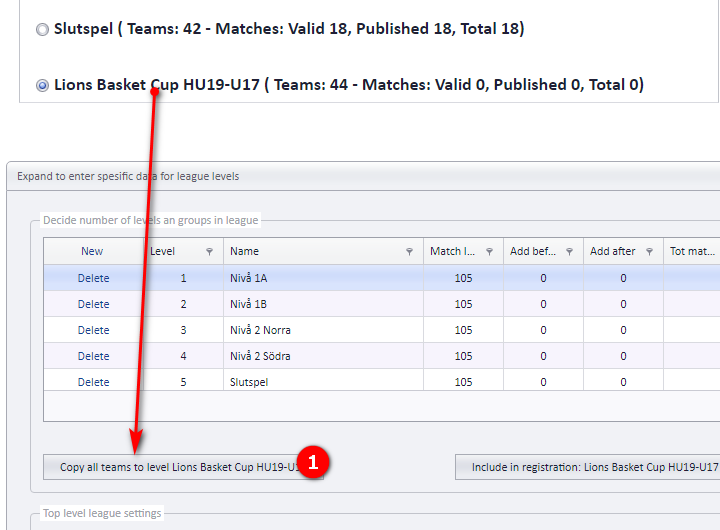
Refresh the teams in the playoff level
- After the teams are registered in the playoff, click the button shown in the picture below.
- When to make a new level at all, and how levels and groups are organised: "League levels and groups".
- Building and editing the playoff tree itself: "Building a cup or playoff tree" and "Editing a playoff match".
- Making the rounds and generating the group-play schedule in detail: "Prepare and generate the schedule".
- Registering, copying and moving teams between levels: "Teams in a league" and "Replacing, deleting and moving teams".
- The registration site clubs use to register teams: "The league registration site".
- Plain group play without a playoff, and pool play: "Ordinary group play" and "Pool play and cross-pool play".
- How the group table decides who goes through: "Standings and ranking criteria".
See also
Was this page helpful?