Play types and special play systems
The alternatives to the default group play in the Profixio Scheduler: direct cup play without groups, league play inside the final play, FourSet skill-based rounds, Monrad, and split matches (Tripleball). Each section shows where the play type is turned on and what it changes for the schedule.
Looking for something else? Dates, categories, fields and match length Making the schedule Ranking tables and result positions
As default, all categories play a group play and some also go to a playoff to decide winner and other positions. That default needs no special setting in TXO.
The play types and play systems described on this page are the alternatives to that default:
- Only cup play — teams are seeded straight into a cup tree, with no group play in front of it.
- League play — one or more league tables, built from positions in the group play and placed inside the final play.
- FourSet — a group play where round two and higher follow from the results of the previous round.
- Monrad — a group play run as a number of "series", in the group sizes Monrad supports.
- Split matches (Tripleball) — one match split into three matches, each with a different sport and its own calculation factor.
Each one has its own section below, which says where it is turned on and what it changes.
It is possible to seed teams directly into a cup play, without first a group play. This is most often done in sports using a kind of ranking or seeding system.
Cup play as a play type is meant for very few special situations. A category that should play an ordinary group play and then a cup play keeps the default play type — picking cup play for such a category is the most common mistake made with this setting, so only set it on the categories that really have no group play.
Result registration and so on are the same as for the default play (that is, group play first).
-
Show the column Play type: right-click the column header somewhere and drag the column Play type up as a new column.
TIP: after this column is shown, click Save layout in the top right corner of the grid. TXO then remembers to show this column when you enter this menu later for this tournament.
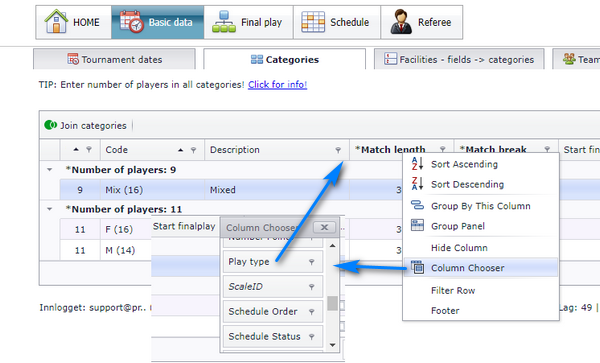
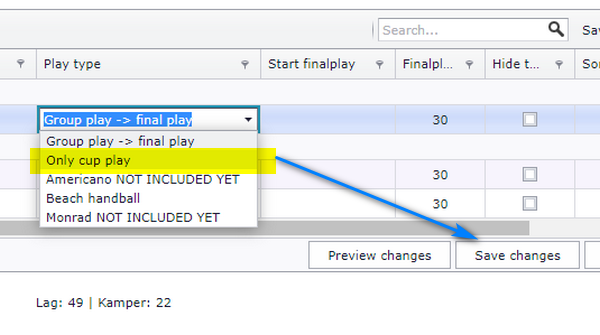
- Select Only cup play for the category or categories which shall use only cup play as playoff. Remember to save the changes. All teams are then placed into one group (Group A).
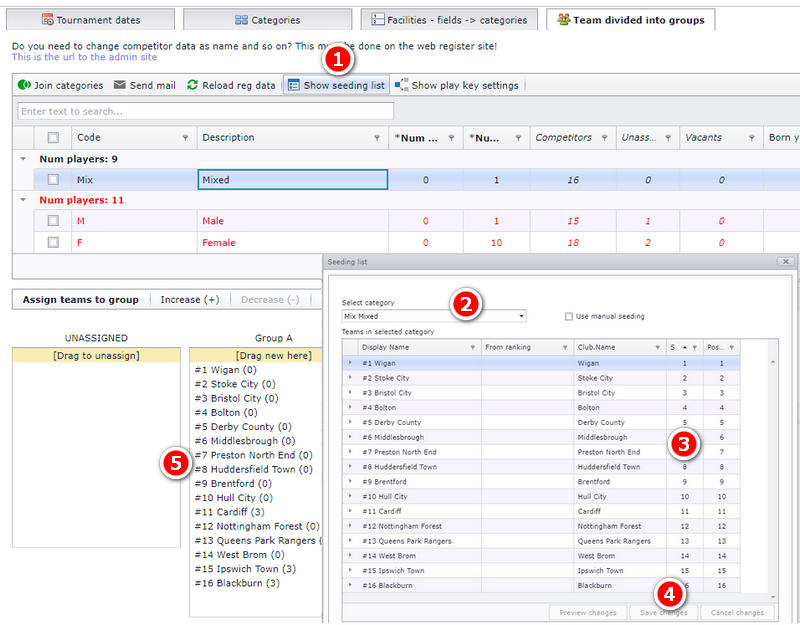
To ensure correct order of the teams, use the seeding list to set the seeding order.
- Enter tab Team divided into groups and then Show seeding list.
- Select category.
- Enter the order of seeding.
- Click Save changes.
- The teams are now shown with their seeding number.
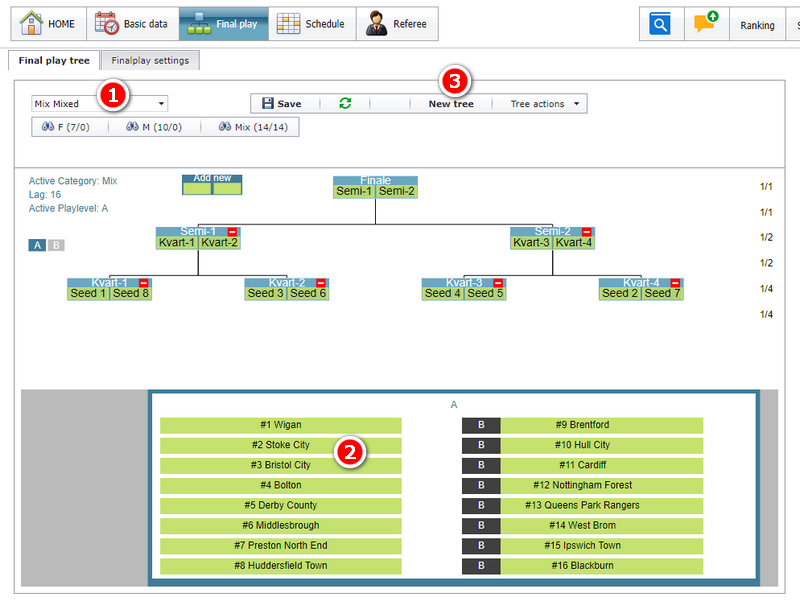
Enter menu Final play to build the tree. When this tree is made, the rest of the match setup is as usual.
- Select the category which you want to make the cup-play for.
- You can now see the teams by their seeding order.
- Use the button New tree to make the tree.
The tree itself is built the same way as any other final-play tree — see Building the final play.
A league play is one or more league tables placed inside the final play, so a category can play a table after the group play instead of going straight into a knockout.
- League play can only be made from positions in the group play.
- The order is group play, then league play, and after a league play you can have an ordinary playoff. A league play cannot be placed after a playoff — group play, playoff, then league play is not an order TXO builds.
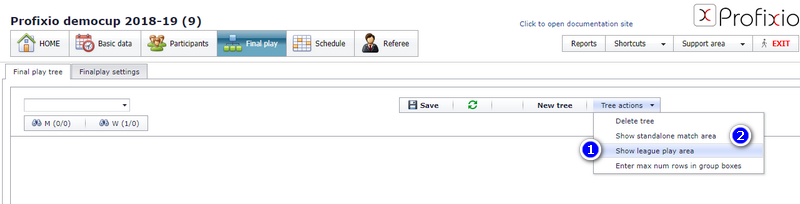
- First of all, the placeholder for league play must be shown. Enter menu Tree actions – Show league play area.
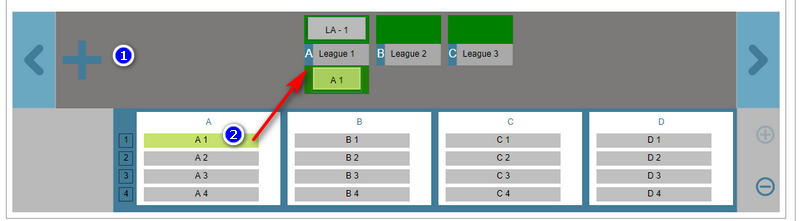
- Click the plus-sign to add one league play. Click several times to add more leagues.
- Drag positions into the league boxes. You can switch competitors whenever you want — just drag in or out of the league boxes.
NOTE: you must click the Save button to save the playoff tree.
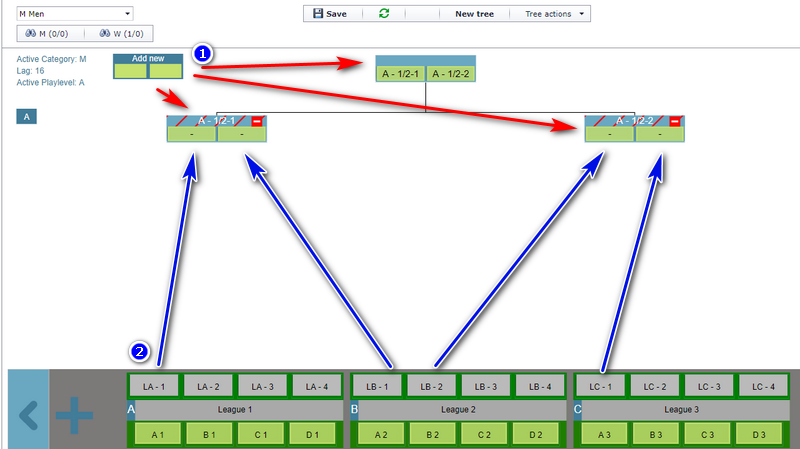
You can make a playoff after league play.
- Start with making new matches by dragging the new box to correct position. In the example, one final and semi-finals have been made.
- Drag positions from the league play up into the playoff boxes.
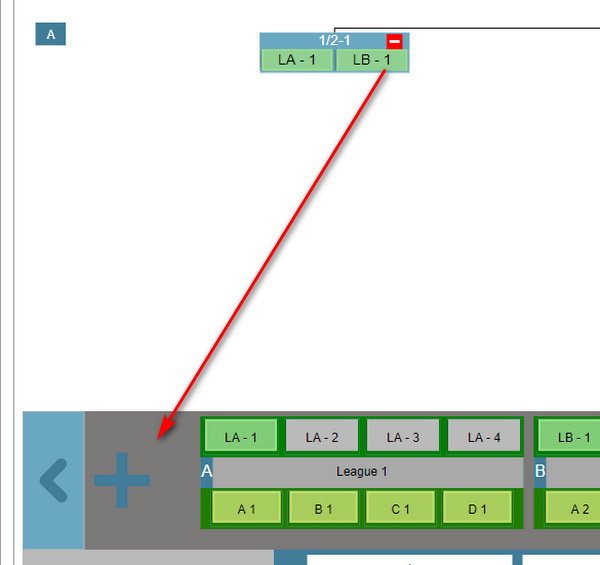
You can change data by dragging it between boxes.
To delete data, either drag the positions out from the box, or right-click on the box or on a competitor and select Delete.
A play key called FourSet activates a play system where round two and higher depend on the results from the previous round: winner meets winner, loser meets loser.
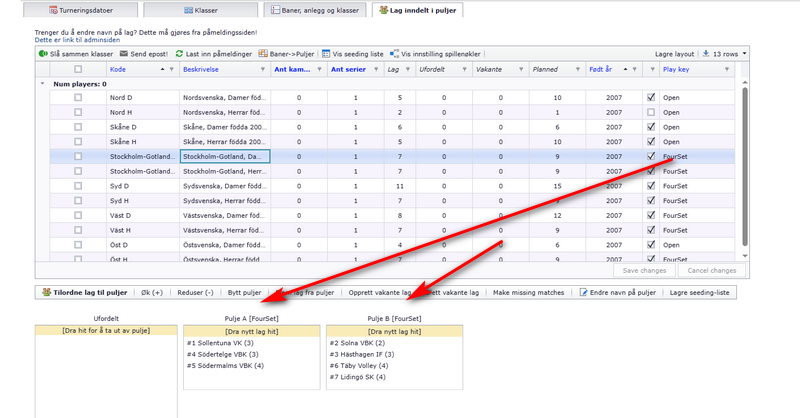
- With the FourSet play key, the number of teams in a group MUST be 3, 4 or 5.
- Round number 1 is running as default, but round number 2 is based on results from round number 1.
- When results are registered on the web, the teams in round number 2 are filled in.
- Playoff can be made as usual after group play.
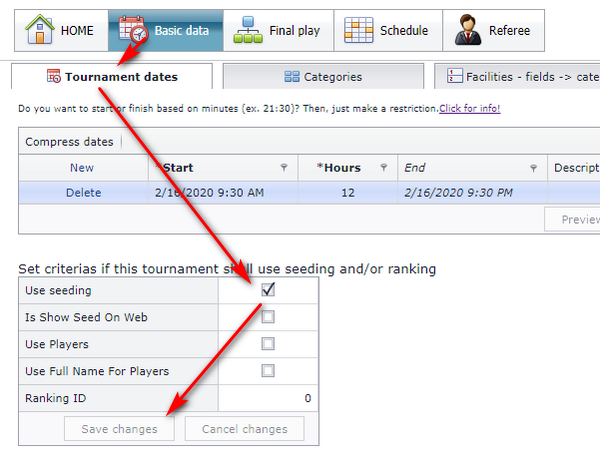
- First of all, activate use of seeding. The parameter Use Seeding has to be turned on for this play system.
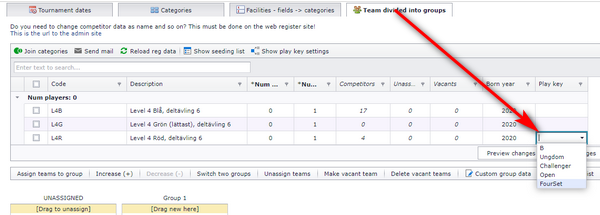
- Select the play key FourSet from the column Play key. You can now make your match schedule as usual.
Example: Fourset with 3 and 4 teams in group.
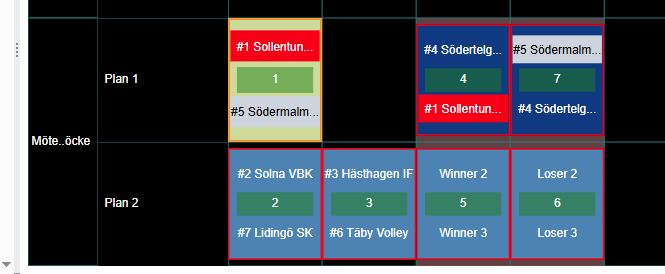
Matches are then scheduled like this:
- In a group with 3 teams, 3 matches are scheduled as #1-#5, #4-#1, #5-#4.
- In a group with 4 teams, 4 matches are scheduled based on winner/loser in the last two matches.
There are two types of play types for groups with 3 teams using Fourset.
- Fourset-3: #2 – #3 (semi), and the winner meets #1 in the final match.
- Fourset with 3 teams in a group: #1 – #2, #1 – #3, #2 – #3. All teams are then playing 2 matches.
The match order in each of the two variants is fixed by the play key, so the schedule follows it once the key is selected.
Monrad is a play system run as a number of "series". Using Monrad demands some preparations in TXO, described in the next section.
As for now, Monrad can only be used in groups with these number of teams:
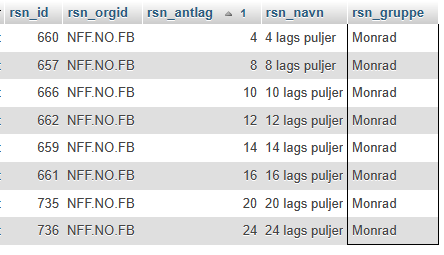
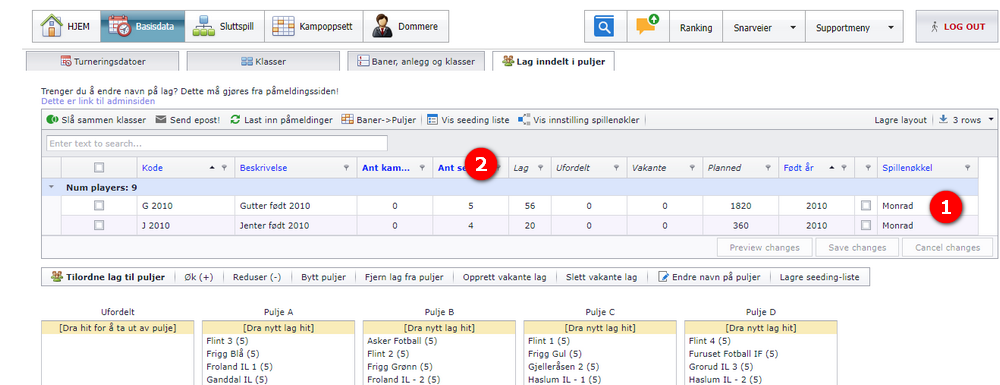
Basic data
- Select to use Monrad.
- Enter the number of series to play. More than 5 series gives a poor distribution of teams, so keep the number at 5 or below.
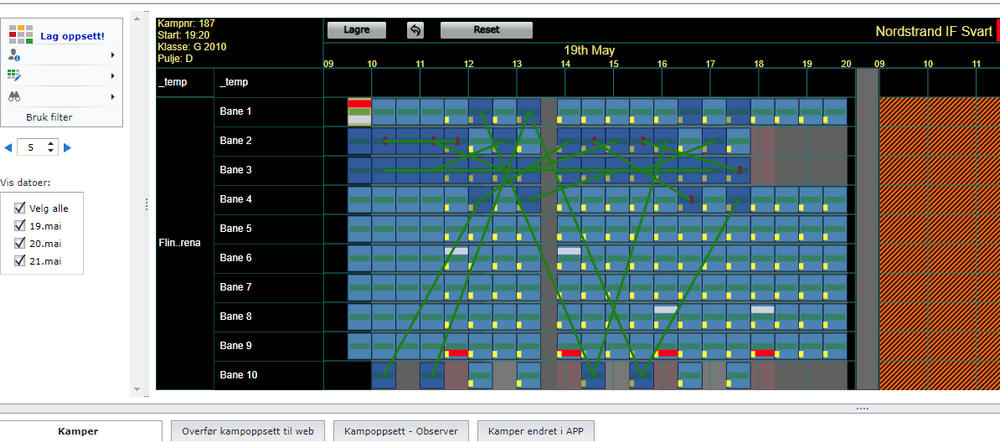
Schedule
Make all the matches. Use unassigned field and time for easier positioning.
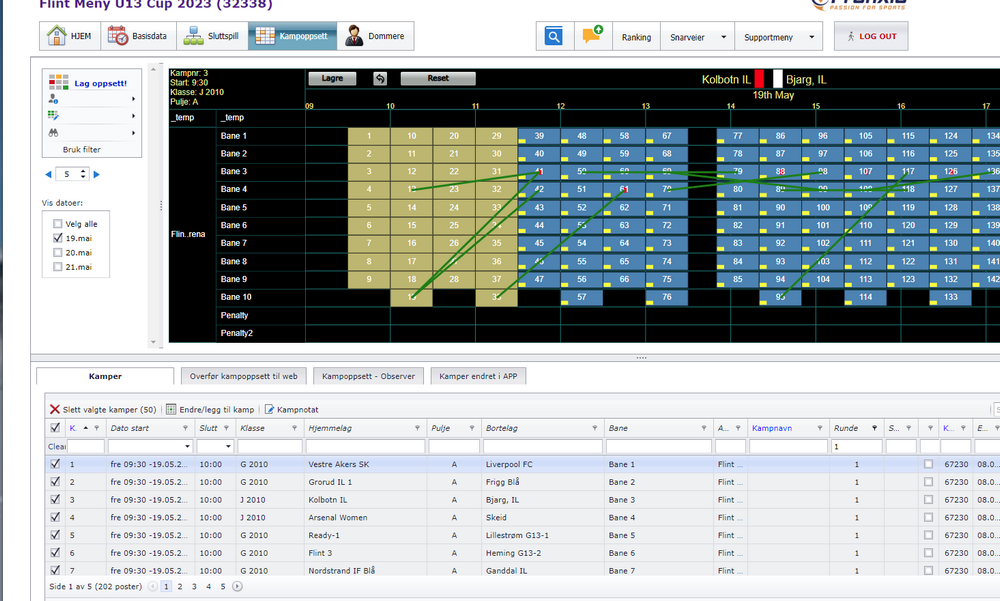
Import the first round
If the first round is set to have defined teams playing each other, use the import routine.
Set round number
All rounds must be set in correct order. It is easiest to make the matches unscheduled; they are then positioned on the temp-venue in correct order.
Final play
Set names on the levels, and set the position on the position matches.
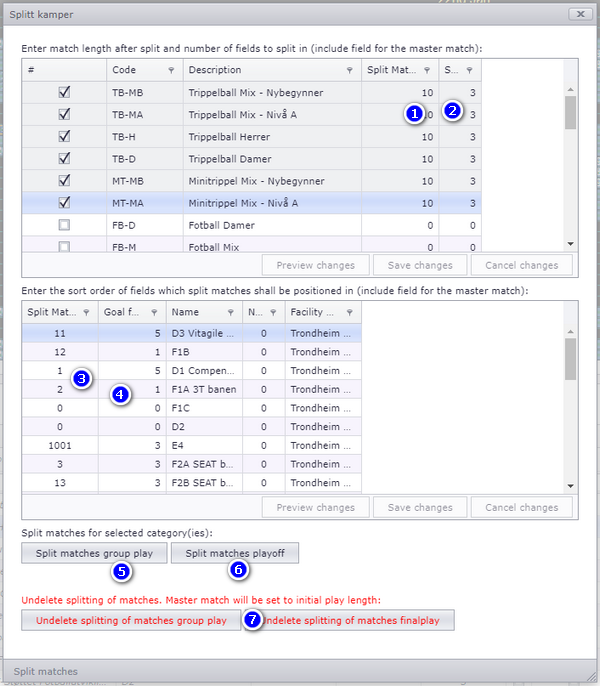
Tripleball is a typical split match variant. Tripleball defines one match split into three matches, each with a different sport and with different calculation factors.
- When scheduling, only the master match is scheduled, with the total match length. The master match is scheduled exactly as other matches which are not included in split matches. If each child match shall have a playtime of 15 min, the master match must be set to 45.
- The sort order of fields is important, because the matches MUST follow that order.
- In settings, check on Split matches (tripleball).
- Open the popup Split matches and enter the values for the three part matches.
This page covers the alternatives to the default group play and how each one is turned on. For the work around them:
- building and editing the final-play tree itself — Building the final play
- dividing teams into groups, and the seeding list in general — Dividing teams into groups and seeding
- categories, fields and match length — Dates, categories, fields and match length
- making and positioning the matches — Making the schedule
- how tables and result positions are worked out — Ranking tables and result positions
- setups that apply to one sport or one federation only — Sport and federation specific setups
- a league played over a whole season — Running a season-long league in TXO
See also
Was this page helpful?